
Discover how DeskSense can revolutionize your daily digital tasks. This comprehensive review explores its powerful AI capabilities designed to boost productivity across various platforms.
We will delve into its core features, how it operates, and practical applications, helping you understand its potential to become an indispensable tool for content creators, professionals, and anyone seeking to streamline their workflow.
What is DeskSense – Your AI Assistant | AppSumo
DeskSense is presented as an AI-powered digital companion designed to assist users across all their online activities. It aims to simplify tasks ranging from problem-solving and coding to content creation and communication, leveraging advanced AI technology.
Key Features
- AI-Powered Assistance: Offers help with problem-solving, coding, content amplification, and generating various forms of written communication.
- Content Regeneration and Summarization: Built-in features allow users to regenerate existing content and summarize webpages for improved clarity and relevance.
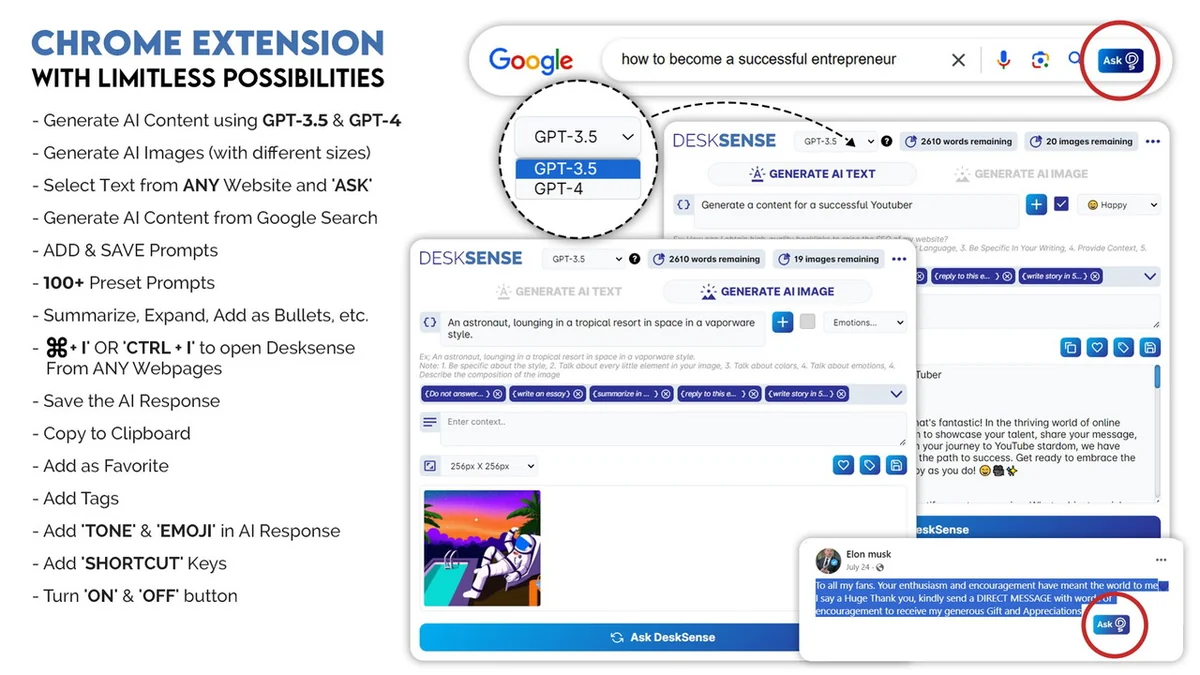
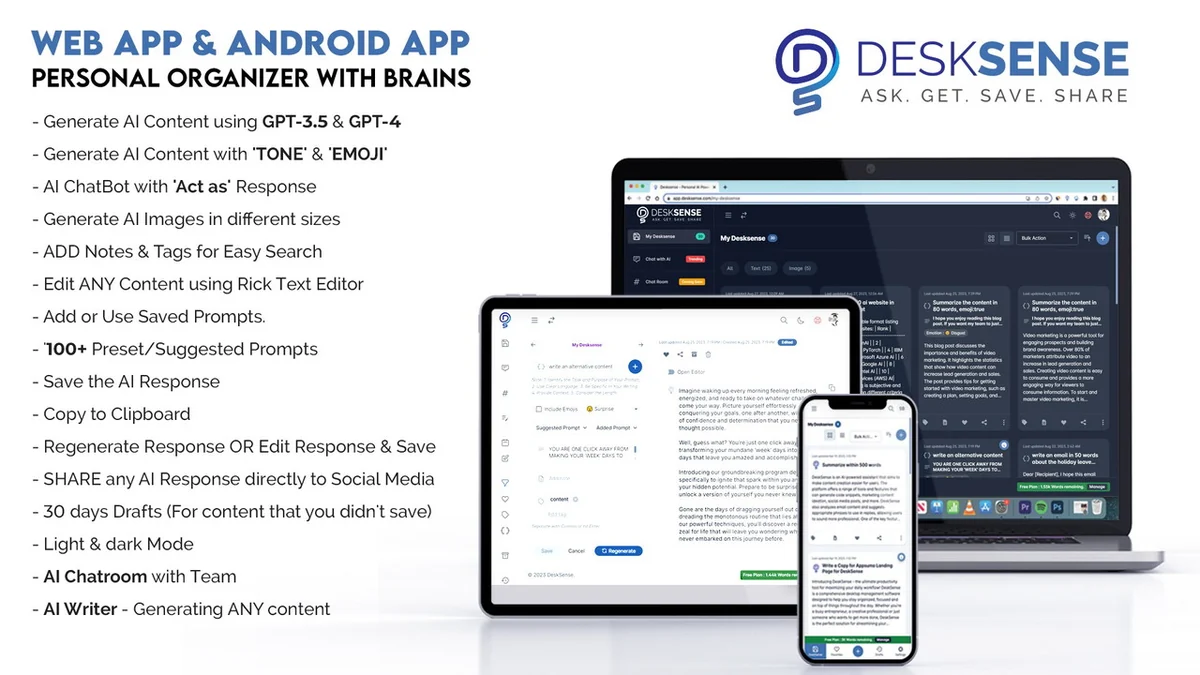
- Platform Accessibility: Available through a Chrome Extension, Web App, and Mobile App for seamless integration into your digital routine.
- Customization and Control: Features like “Add your own prompts,” over 100 preset prompts, word count, and auto-complete empower users to tailor the AI’s responses.
- GPT-4 Integration: Experience the latest advancements with GPT-4 support, ensuring cutting-edge AI capabilities.
- AI-Writer: A dedicated tool for generating various content types quickly using templates and AI.
- AI Chatroom: Facilitates collaboration with features like mentions, attachments, and emoji integration within an AI-powered chat environment.
- Human-like Responses: The ability to input ‘TONE’ and ‘EMOJI’ settings aims to create more natural and engaging AI interactions.
- Content Management: Tools for saving, editing, archiving, and sharing AI-generated content, with options for tagging and categorization.
- User Interface Options: Includes dark and light modes for a comfortable user experience.
How It Works
Accessing DeskSense is designed to be straightforward. Through the Chrome Extension, users can activate it by pressing a keyboard shortcut (CMD + I or CTRL + I) on any webpage. Alternatively, selecting text on a website and clicking the “ASK” icon provides instant answers related to the chosen text.
The Web App offers a comprehensive experience with all the functionalities of the extension and more. Users can interact with DeskSense by inputting prompts, providing context, and specifying desired tones or emojis. The AI then processes this information to generate responses, which can be further edited, saved, or shared.
Use Cases
- Content Creation: Generate articles, blog posts, social media updates, and marketing copy.
- Email Management: Draft emails, craft replies, and ensure professional communication.
- Coding Assistance: Get help with writing and understanding complex code snippets or Excel formulas.
- Research and Summarization: Quickly condense lengthy web content or research materials.
- Personalized Assistance: Receive tailored answers and solutions to specific questions or problems.
- Collaboration: Utilize the AI Chatroom for team communication and idea generation.
Integrations & Compatibility
- DeskSense is built to be accessible across multiple platforms
- Its Chrome Extension integrates directly into your web browsing experience, allowing it to function on virtually any website
- The Web App provides a centralized hub for its features, and the Mobile App extends its utility to on-the-go use.
Pricing & Value
DeskSense is available through AppSumo, offering a lifetime deal that provides access to its features. The value proposition centers on offering a comprehensive AI assistant at a one-time cost, aiming to provide long-term benefits for productivity and content creation without recurring subscription fees.
Deal Details
The AppSumo deal for DeskSense typically includes access to all current and future updates, along with a generous money-back guarantee, allowing users to test the product thoroughly.
Quick Take
- Ideal for content creators, marketers, and busy professionals.
- Streamlines writing, research, and communication tasks.
- Offers a lifetime access deal for significant long-term value.
FAQs
Is there a guarantee period for DeskSense?
Yes, DeskSense comes with a 60-day money-back guarantee for trial.
How can I save my AI-generated content?
You can save results as cards in “My DeskSense” for easy access and organization.
Does DeskSense support the latest AI models?
Yes, DeskSense is now in GPT-4 and allows for model switching.
Can I use DeskSense on any website?
Yes, the Chrome Extension allows DeskSense to be used on virtually any website.
What is the primary function of DeskSense?
DeskSense acts as an AI-powered digital companion to assist with various tasks.
Final Thoughts
DeskSense – Your AI Assistant | AppSumo presents a compelling offer for individuals and businesses looking to enhance their digital productivity. Its wide range of features, accessibility across devices, and the value of a lifetime deal make it a noteworthy tool in the AI assistant market.
The ability to customize prompts, regenerate content, and integrate seamlessly into daily workflows suggests DeskSense can be a significant asset for streamlining tasks and amplifying creative output.