
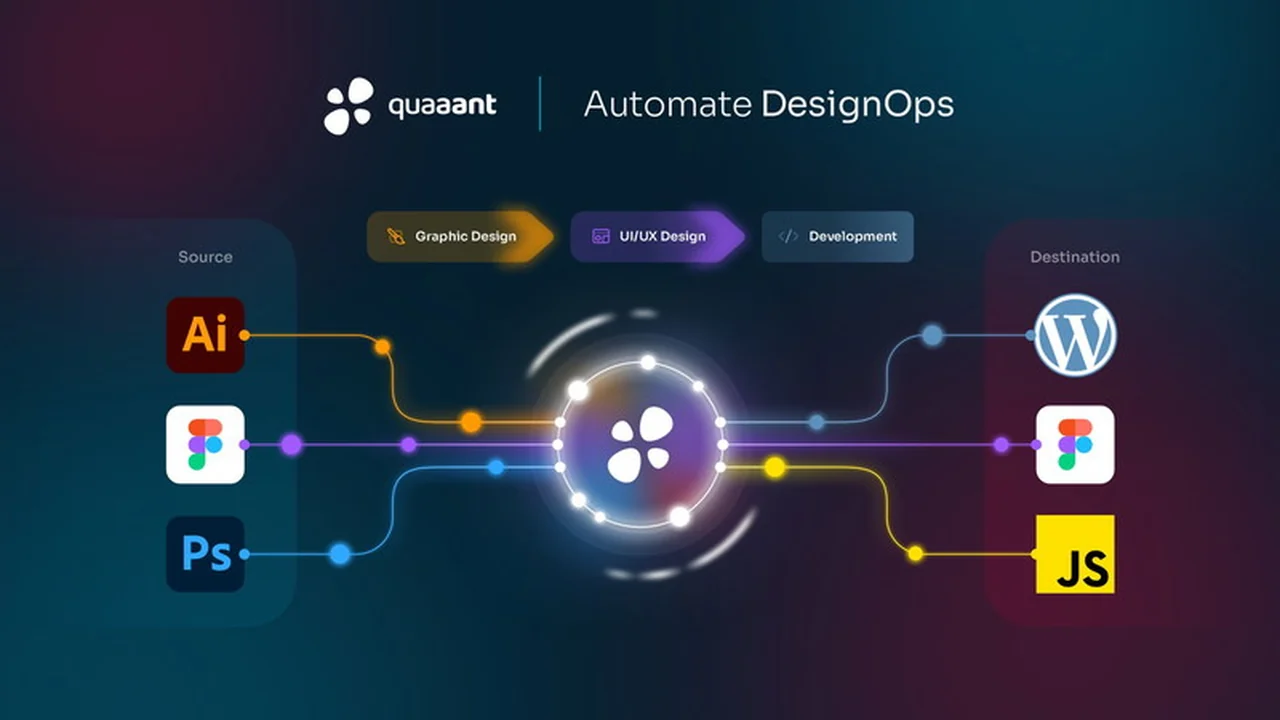
Managing design assets across multiple platforms and team members can be a significant bottleneck for product development. The constant need to export, import, and re-sync often leads to wasted time and potential errors.
This review delves into Quaaant, a tool aiming to solve these challenges. We’ll explore its core functionalities, how it integrates into your workflow, and its potential to accelerate your design and development cycles.
What is Quaaant | AppSumo
Quaaant is a platform designed to synchronize design assets throughout your product team and across your entire tool stack. It addresses the common pain points of manual asset management, such as repetitive exporting and importing, by ensuring that design elements remain consistent no matter where they are used.
Key Features
Quaaant offers a suite of features aimed at improving the efficiency and collaboration between design and development teams.
- Seamless Asset Synchronization: Keep design assets updated across your team and tools automatically, eliminating manual reworks.
- Asset Creation and Linking: Designers can create assets directly within Figma or link them from Adobe Illustrator and Photoshop into Figma through the Quaaant platform.
- Component and Token Management: Build reusable components and establish design tokens, with variables assigned to them, all while maintaining synchronization. (Note: Components and tokens are currently in private beta.)
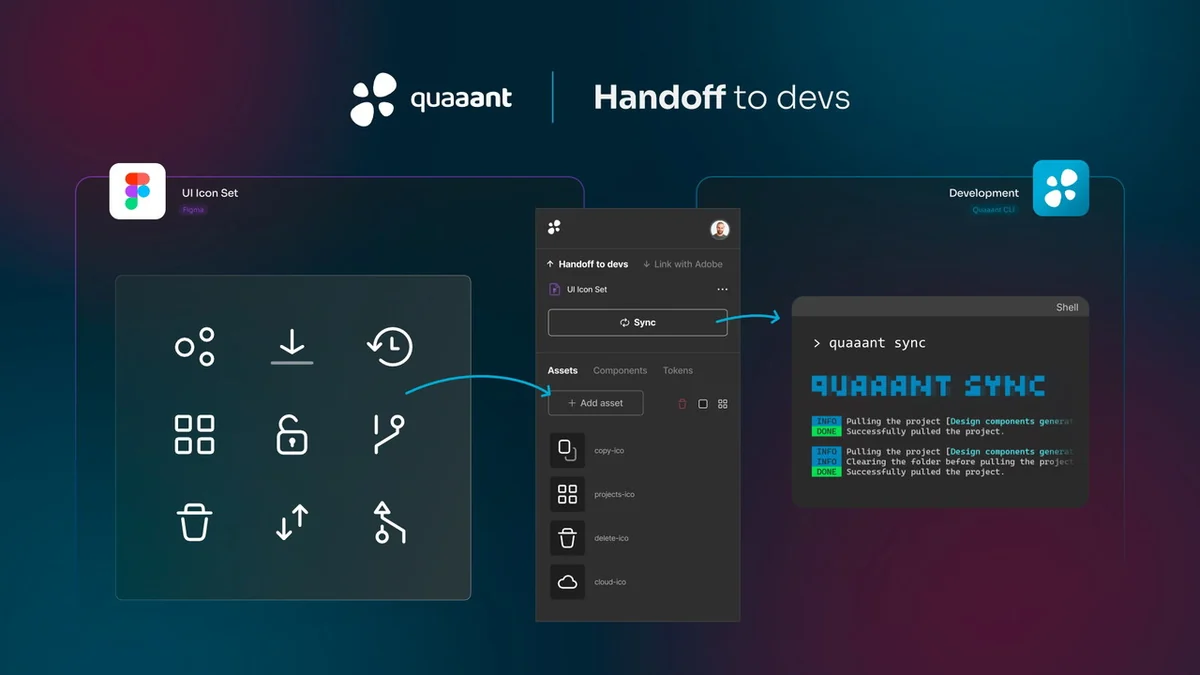
- Developer Handoff Automation: Developers can pull assets directly from Adobe or Figma and utilize components and tokens from Figma, with Quaaant automating the transfer to their development environments.
- Version Control: Offers versioning for your company’s product designs, providing a history of changes and a clear record of asset evolution.
How It Works
Quaaant facilitates a streamlined process from design to development:
1. Asset Creation & Linking: Designers begin by creating assets within Figma or importing them from Adobe Illustrator and Photoshop. These assets are then linked into Figma, managed centrally by Quaaant.
2. Component & Token Building: With assets in place, designers can construct components and define design tokens. Variables are assigned to these elements, ensuring consistency and reusability, with Quaaant keeping everything in sync.
3. Handoff & Iteration: Developers can access and pull assets directly from Adobe or Figma. They can also leverage the components and tokens created in Figma. Quaaant automates the synchronization of these assets into the developers’ chosen environments, allowing for rapid iteration.
Use Cases
Quaaant is particularly beneficial for teams that:
- Struggle with manual export/import processes for design assets.
- Need to ensure design consistency across web, mobile, and other development platforms.
- Have distributed product teams working with various design and development tools.
- Aim to reduce development time by automating asset delivery.
- Seek a centralized system for managing and versioning design assets.
Integrations & Compatibility
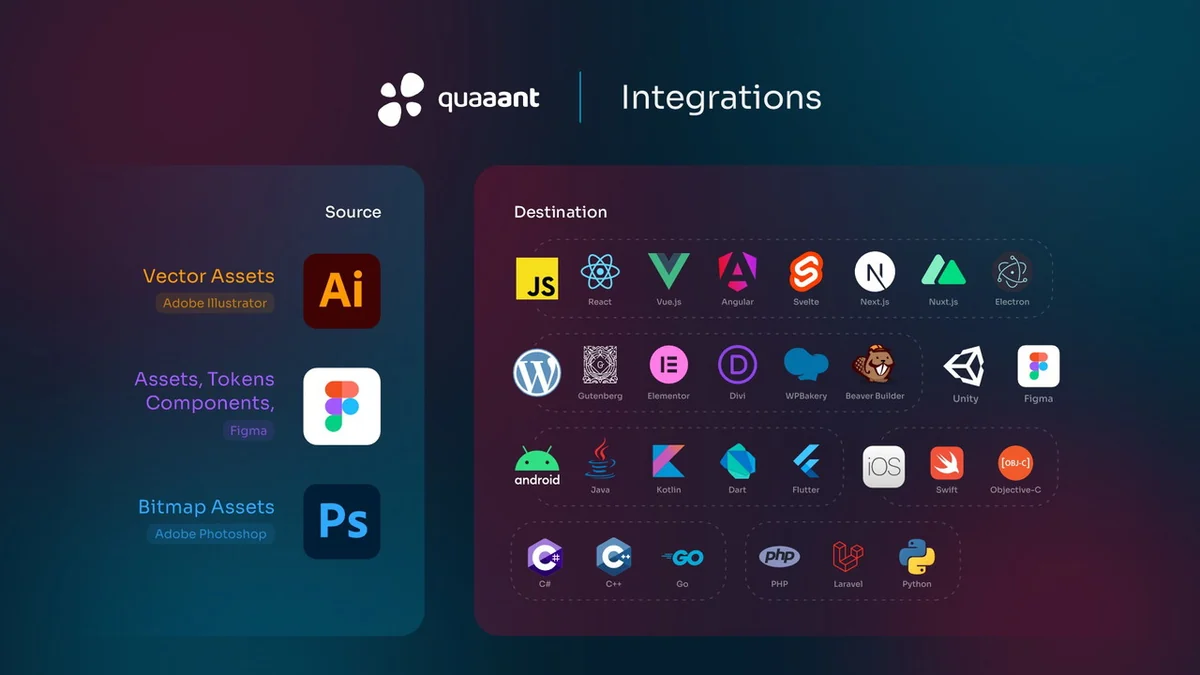
Quaaant supports a wide range of integrations to connect your design and development workflows:
Supported Source Integrations:
- Figma
- Adobe Illustrator
- Adobe Photoshop
Supported Destination Integrations:
- Design Tools: Figma
- Frontend Frameworks: JavaScript, React, Vue.js, Angular, Svelte, Next.js, Nuxt.js
- Desktop Apps: Electron
- CMS Builders: Gutenberg, Elementor, Divi, WPBakery, Beaver Builder
- Mobile Development: iOS (Swift, Objective-C), Android (Java, Kotlin, Dart, Flutter)
- Game Development: Unity
- General Purpose Languages: C#, C++, Go, PHP, Laravel, Python
While Quaaant aims for broad compatibility, it’s worth noting that direct integrations with tools like Affinity software are not currently possible due to the lack of SDKs or APIs. Exploration of potential future integrations with platforms like Webflow is ongoing.
Pricing & Value
The value proposition of Quaaant lies in its ability to reduce manual labor, minimize errors, and accelerate the product development cycle. By automating asset synchronization, it frees up valuable time for both designers and developers to focus on core tasks.
Deal Details
The AppSumo deal for Quaaant typically offers a significant discount on its regular pricing, making it an accessible option for small to medium-sized businesses and individual professionals. This limited-time offer allows users to acquire a powerful asset management tool at a fraction of the cost. A key benefit of the AppSumo purchase is the 60-day money-back guarantee, providing ample time to test the platform and ensure it meets your specific needs.
Quick Take
- Ideal for product teams seeking to automate design asset syncing.
- Reduces manual export/import tasks and speeds up iteration cycles.
- Offers a broad range of integrations for diverse tool stacks.
FAQs
What is the money-back guarantee period for Quaaant?
Quaaant comes with a 60-day money-back guarantee for a risk-free trial.
Is Quaaant GDPR compliant?
Yes, Quaaant’s policies are fully aligned with EU regulations, including GDPR compliance.
How does Quaaant help developers?
Developers can pull assets and use components/tokens directly, with Quaaant automating sync to their environments.
Can Quaaant handle assets from Adobe Photoshop and Illustrator?
Yes, Quaaant supports importing assets from Adobe Photoshop and Illustrator.
What is the primary benefit of using Quaaant?
Quaaant’s main benefit is syncing design assets across your product team and entire tool stack.
Final Thoughts
Quaaant presents a compelling solution for teams bogged down by inefficient design asset management. Its ability to synchronize assets across a diverse tool stack, coupled with automated handoff processes, can lead to substantial gains in productivity and a reduction in development friction. While user feedback has highlighted some initial concerns regarding privacy terms, the company has actively addressed these, emphasizing their commitment to GDPR compliance and user data security.
The breadth of integrations, especially for development environments, makes Quaaant a versatile tool. For those looking to streamline their design-to-development workflow and ensure consistency across projects, Quaaant, particularly through its AppSumo offering with a generous money-back guarantee, is certainly worth serious consideration.