
Tired of manually sifting through spreadsheets and performing repetitive tasks? Imagine reclaiming hours every week by letting a smart add-on handle the heavy lifting for you.
We will explore its core functionalities, understand how it transforms your data management, and uncover practical ways to integrate it into your daily operations. Discover how this tool can significantly reduce manual effort and free up your valuable time.
What is Sheet Automation for Google Sheets – Automate tasks | AppSumo
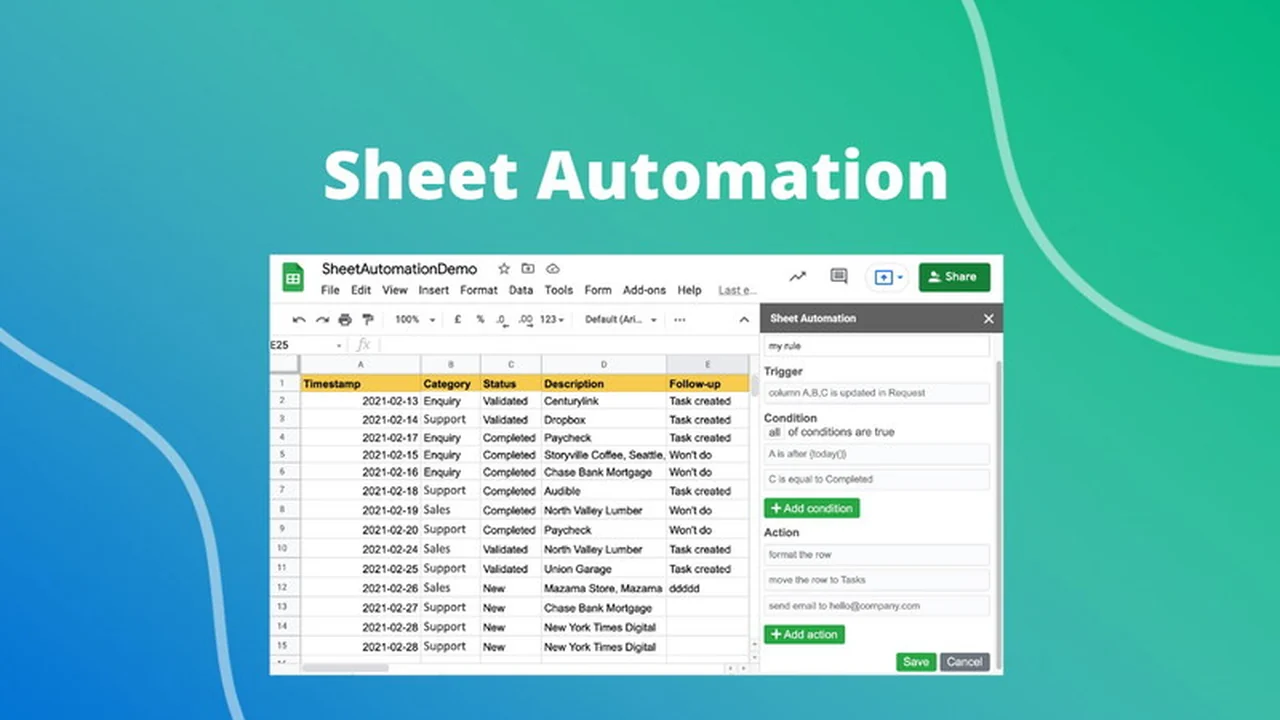
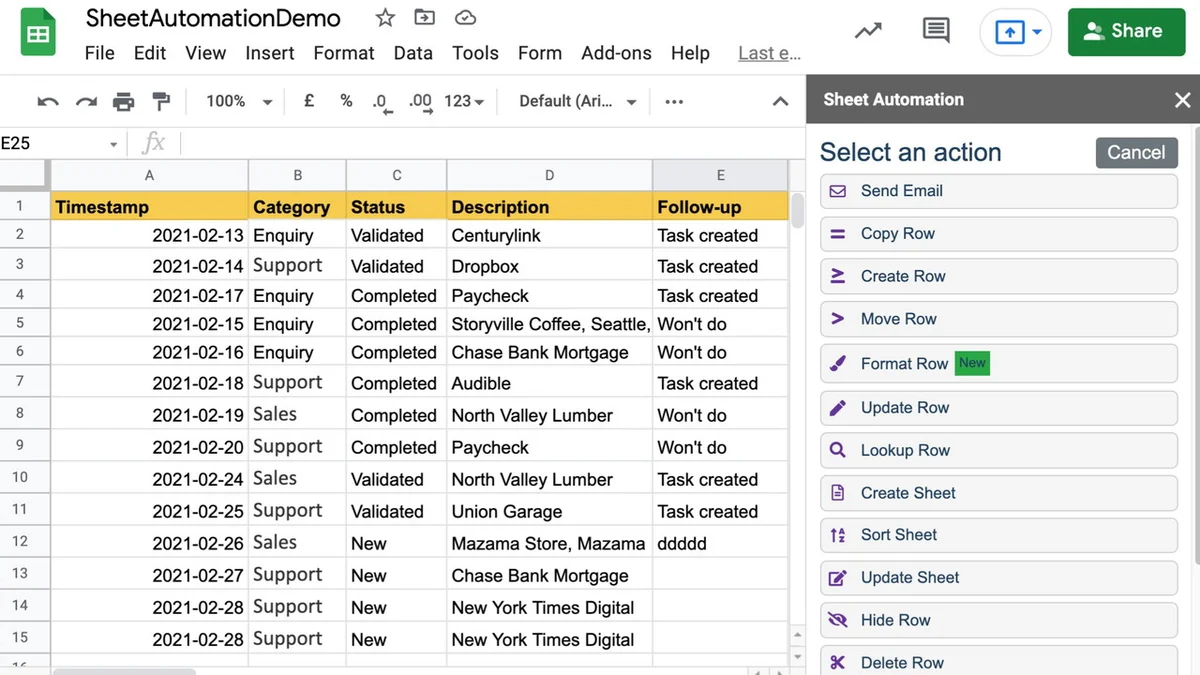
Sheet Automation for Google Sheets is a no-code Google Sheets add-on that empowers users to automate a wide range of repetitive tasks without needing to write any code. It functions as an intelligent assistant within your spreadsheets, capable of handling operations like moving or copying rows, sending timely notifications, monitoring data changes, populating and updating information, and formatting your sheets according to predefined rules.
Key Features
This add-on boasts a robust set of features designed to tackle common spreadsheet challenges:
- Conditional Form Response Notifications: Automatically alert recipients based on specific form submission criteria.
- Slack or Email Alerts for Data Changes: Receive instant notifications when data within your sheet is modified.
- Sheet Change Tracking and Transaction Logging: Maintain a comprehensive history of all modifications made to your sheets.
- Sales Lead or Marketing Inquiry Assignment: Automate the distribution of incoming leads to the appropriate team members.
- Project Task Management Automation: Streamline workflows by automating task assignments, status updates, and deadline reminders.
- Inventory Level or KPI Metrics Monitoring: Keep a close eye on critical business metrics and inventory levels with automated updates.
- Bulk Data Processing: Efficiently handle large datasets for updates, formatting, or movement.
- Populate and Update Data: Automatically fill in or modify data fields based on various triggers or conditions.
- Format Sheets Automatically: Ensure consistent formatting across your spreadsheets by automating styling rules.
How It Works
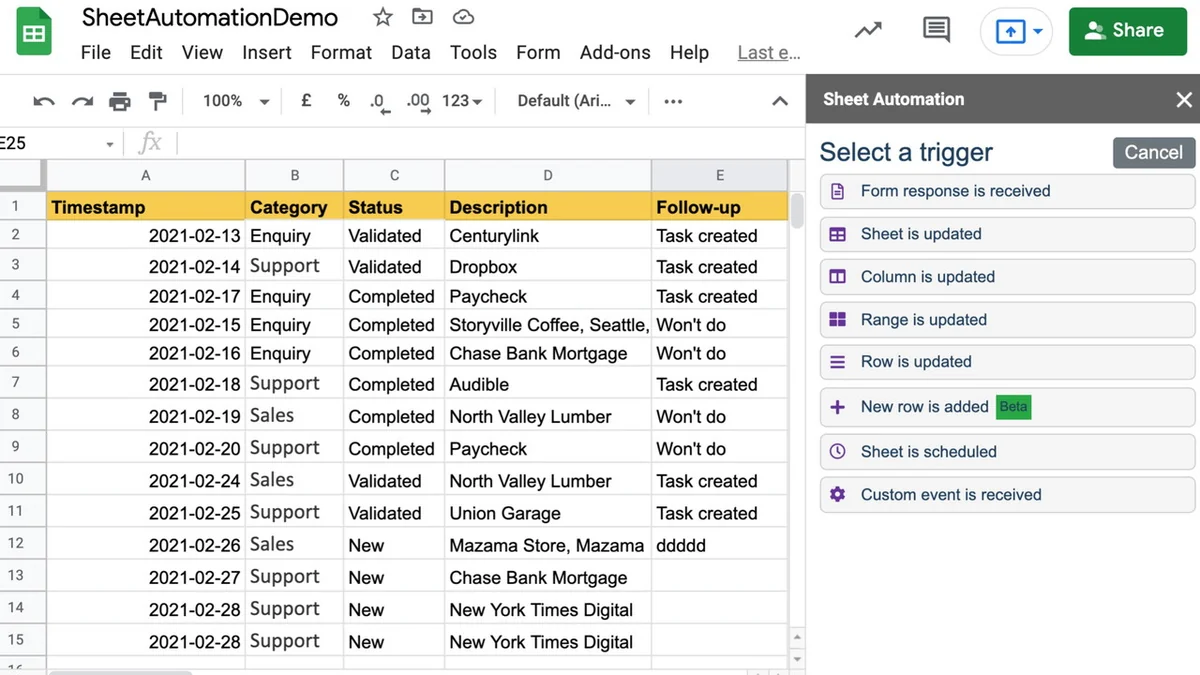
The core principle behind Sheet Automation is its trigger-action system. You set up specific conditions (triggers) within your Google Sheet, and when those conditions are met, the add-on executes predefined actions. This could be as simple as a new row being added, a cell value changing, or a specific date arriving. The add-on then performs the designated task, such as sending an email, moving a row to another sheet, or updating a status column, all without manual intervention.
The user-friendly interface allows you to visually build these automation workflows. You can define multiple rules and conditions to create complex automation sequences that perfectly match your specific needs.
Use Cases
Sheet Automation for Google Sheets is incredibly versatile and can be applied across various scenarios:
- Sales and Lead Management: Automatically assign new leads to sales reps based on territory or product interest, and send follow-up reminders.
- Marketing Campaigns: Trigger notifications for form submissions, update campaign tracking sheets, or send personalized follow-up emails.
- Project Management: Automate task assignments, update project statuses, and send reminders for upcoming deadlines.
- Inventory Control: Monitor stock levels and trigger alerts when inventory falls below a certain threshold.
- Data Entry and Cleanup: Automatically format new entries, check for inconsistencies, or move data to archive sheets.
- Customer Support: Route support tickets to the appropriate department or send automated acknowledgments.
- Reporting: Automatically compile data from various sources, format reports, and distribute them to stakeholders.
Integrations & Compatibility
- Sheet Automation for Google Sheets seamlessly integrates with Google Workspace
- While it doesn’t directly turn your sheets into an API like some other services, it does support calling webhook endpoints, allowing for connections with other tools and services
- This capability opens doors for further automation possibilities when combined with platforms that can consume webhook data
- Users are also exploring creative solutions using built-in sheet formulas in conjunction with the add-on for tasks like duplicate detection, with the development team indicating that direct duplicate removal may be a future feature.
Pricing & Value
The value proposition of Sheet Automation for Google Sheets lies in its ability to significantly reduce the reliance on expensive third-party automation tools or custom development. By offering a no-code solution directly within Google Sheets, it democratizes automation for a wider audience. The efficiency gains and time savings can translate into substantial cost reductions for businesses of all sizes. The availability of a free version allows potential users to test its capabilities before committing to a paid plan, making it a low-risk investment.
Deal Details
This offer provides lifetime access to the Sheet Automation for Google Sheets Plan. It’s important to redeem your code(s) within 60 days of purchase to activate your access. The deal includes all future updates to the Sheet Automation for Google Sheets Plan, ensuring you always have access to the latest features and improvements. Additional codes can be stacked to upgrade to higher tiers, offering more advanced capabilities for demanding workflows.
Quick Take
- Ideal for individuals and businesses heavily reliant on Google Sheets for data management and task execution.
- A robust no-code alternative that significantly reduces the need for complex scripting or costly third-party tools.
- Perfect for automating repetitive tasks, streamlining workflows, and improving overall operational efficiency.
FAQs
Does this offer an easy way for people to do import range?
Sheet Automation focuses on tasks beyond standard ImportRange functionality for specialized needs.
Can this turn Google Sheets into an API?
Turning sheets into an API is not currently supported, but webhook calling is available.
Can this app handle several rules conditions for one row input?
Yes, it can process multiple rules and distribute rows to different sheets based on column values.
Can I remove duplicate entries?
Duplicate removal is on the roadmap, but workarounds exist using formulas and automation.
Is this tool still being supported?
Yes, the development team actively supports the tool and is working on feature enhancements.
Final Thoughts
Sheet Automation for Google Sheets is a powerful, user-friendly add-on that delivers on its promise of simplifying and automating repetitive spreadsheet tasks. Its no-code approach makes advanced automation accessible to everyone, regardless of technical expertise. The extensive features, practical use cases, and the potential for significant time and cost savings make it a compelling solution for anyone looking to optimize their Google Sheets workflows. With a generous free plan and a comprehensive lifetime deal, there’s a clear path to explore its benefits and integrate it effectively into your operations.