
Are you struggling to present your WordPress data in a clear, engaging, and visually appealing manner? Many users find it challenging to create dynamic tables and charts without resorting to complex coding.
This review explores how wpDataTables, available through an AppSumo deal, offers a powerful yet user-friendly solution for transforming raw data into insightful visualizations right within your WordPress site.
What is wpDataTables | AppSumo
wpDataTables is a premium WordPress plugin designed to help you create responsive tables, graphs, and charts from your data with ease. The AppSumo deal provides access to this robust tool, simplifying the process of managing and displaying complex information for your audience.
Key Features
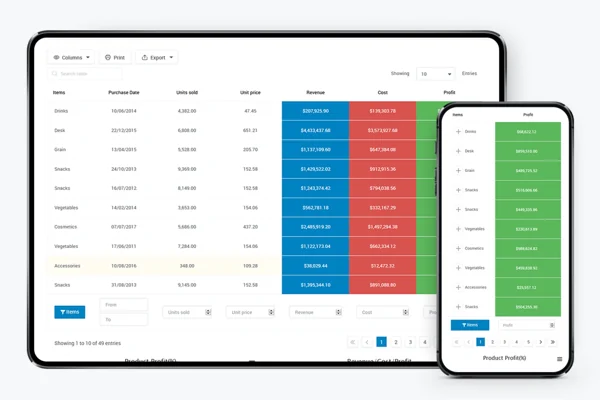
- Responsive Tables and Charts: Ensure your data looks great on any device, from desktops to mobile phones.
- Data Source Flexibility: Upload data from existing sources like Excel, CSV, Google Sheets, MySQL queries, JSON, and XML, or input it manually.
- Advanced Customization: Control color palettes, insert company logos, and fine-tune the appearance of your tables.
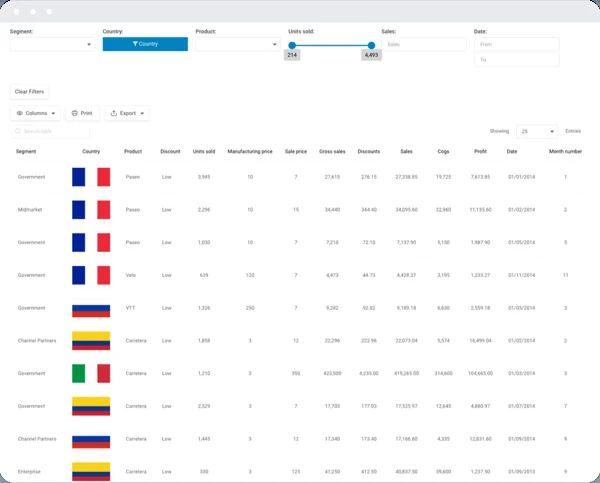
- Conditional Formatting: Highlight specific rows, columns, or cells based on predefined conditions to draw attention to key data points.
- Form-Based Calculations: Automatically calculate sums, averages, minimums, and maximums within your tables.
- Foreign Key Functionality: Connect multiple tables to avoid data duplication and maintain data integrity.
- Multiple Database Support: Connect to various databases including MySQL, MS SQL, and PostgreSQL for greater flexibility.
- Dynamic SQL Queries: Create SQL queries with placeholders for dynamic data retrieval.
- Chart Creation Wizard: Easily build custom charts using Google Charts, Highcharts, or Chart.js rendering engines, with options for pie, bar, line charts, and more.
- Front-end and Back-end Editing: Edit table data directly from both the WordPress dashboard and the front-end of your website.
- User Permissions: Control who can view or edit specific table data, enhancing security and data management.
How It Works
Getting started with wpDataTables is designed to be straightforward. The process generally involves three main steps:
1. Data Input: You begin by uploading your data from various sources or entering it manually. wpDataTables supports a wide array of formats, making it easy to import your existing datasets.
2. Configuration: Once your data is imported, you can configure the table with advanced features such as responsive design, conditional formatting, and multi-criteria filtering to enhance usability and appearance.
3. Publishing: Finally, you insert the created table or chart into your WordPress posts or pages using a simple shortcode or the provided Gutenberg block.
Use Cases
- E-commerce: Display product catalogs, price lists, and inventory data.
- Data Analysis: Present statistical data, survey results, and research findings.
- Business Dashboards: Create internal tools to track sales, performance metrics, and project progress.
- Directories and Listings: Build searchable and sortable lists of members, resources, or events.
- Event Schedules: Display event timings, locations, and speaker information in an organized format.
- Educational Content: Illustrate complex concepts with comparative tables and visual charts.
Integrations & Compatibility
- wpDataTables integrates seamlessly with popular WordPress page builders like Visual Composer and the Gutenberg editor
- Its core functionality is built to work within the WordPress environment, ensuring compatibility with most well-coded WordPress themes.
Pricing & Value
The value proposition of wpDataTables, especially when acquired through an AppSumo deal, is significant. It provides a robust feature set that would typically come with a much higher price tag, offering a cost-effective way to enhance your website’s data presentation capabilities.
Deal Details
The AppSumo deal for wpDataTables typically offers a lifetime license, allowing access to the plugin’s features for a one-time payment. Specific details regarding license tiers, future updates, and support are usually outlined on the AppSumo product page. It’s also backed by a 60-day money-back guarantee, allowing you to try it risk-free.
Quick Take
- Ideal for WordPress users needing to display data professionally without coding.
- Offers extensive features for creating dynamic tables and insightful charts.
- A valuable tool for enhancing website engagement and data comprehension.
FAQs
Is this product hard to use or is tech support hard to understand?
While some users find it technical, many appreciate its powerful features once familiarized.
When is this deal coming back?
Check the AppSumo page regularly for potential re-releases or similar offers.
I bought the product and can’t access it. You haven’t answered my emails.
Please contact support for immediate access issues and unaddressed inquiries.
I need it for another site, but I’m unable to add a second site in my dashboard.
Reach out to support to manage multiple site activations for your license.
My licenses are showing EXPIRED!
Contact the support team for assistance with expired licenses.
Final Thoughts
wpDataTables | AppSumo offers a compelling solution for anyone looking to elevate their WordPress site’s data presentation. Its extensive features, ease of use for data input, and robust customization options make it a powerful asset for bloggers, businesses, and developers alike. If you’re looking to turn complex data into clear, visually appealing tables and charts without the hassle of coding, this plugin is definitely worth considering.