
Navigating the vastness of the internet can often lead to digital clutter, with numerous tabs, bookmarks, and scattered notes. This review explores Qlearly, an application designed to bring order to your online life by consolidating these elements.
We will delve into its core functionalities, practical applications, and the overall value it offers, particularly for those seeking efficient digital organization and task management solutions.
What is Qlearly – Organize bookmarks, tasks and notes | AppSumo
Qlearly is a digital organization tool that aims to simplify how users manage their online resources. It provides a centralized platform to store and access bookmarks, tasks, and notes, reducing the need to search through multiple applications or browser tabs.
The core principle behind Qlearly is to enhance productivity by offering a quick and unified way to save, search, and organize web pages and other digital information.
Key Features
- One-Click Tab Saving: Effortlessly save current web pages to your Qlearly boards without leaving your browser.
- Unified Search: Quickly find any saved bookmark, task, or note through a powerful and integrated search function.
- Keyboard Shortcuts: Access and manage your Qlearly content efficiently with customizable keyboard shortcuts.
- Multi-Device Syncing: Keep your bookmarks and tasks synchronized across all your devices for seamless access.
- Collaboration Tools: Share public or private boards with teammates, allowing for shared resource lists and project management.
- Customizable Boards and Columns: Create structured boards with columns tailored to your workflow, organizing content logically.
- Task and Note Creation: Beyond bookmarks, Qlearly allows for the creation of simple tasks and notes directly within the platform.
How It Works
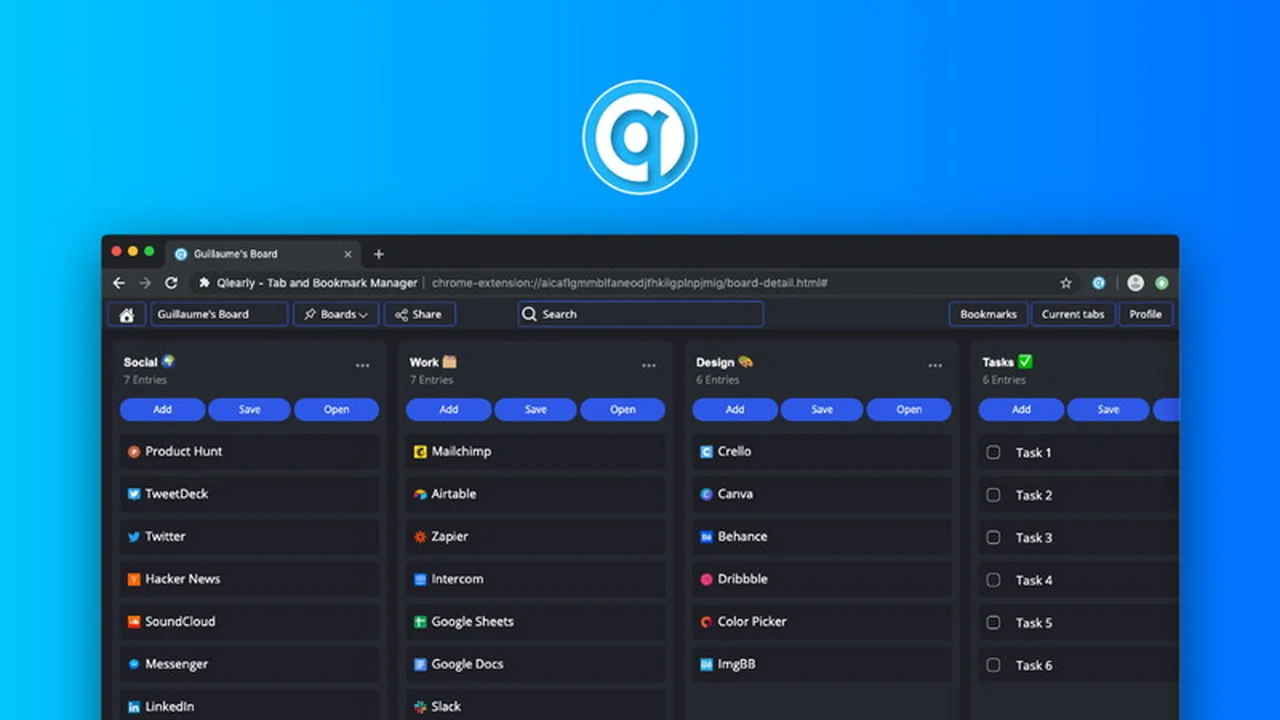
Qlearly operates by creating a visual dashboard where users can arrange saved web links, tasks, and notes into custom boards and columns. The browser extension allows for immediate saving of current tabs, while the main application provides the interface for organization and management.
Users can create different boards for various projects, topics, or personal interests, and within each board, columns can be used to categorize saved items further. This structured approach makes it easy to retrieve information when needed.

Use Cases
- Research Management: Compile and organize research links for articles, studies, or competitor analysis.
- Project Planning: Keep all project-related websites, documents, and tasks in one accessible location for team members.
- Content Curation: Gather and categorize articles, videos, and other content for future reference or sharing.
- Personal Organization: Manage shopping lists, travel plans, or any collection of helpful websites.
- Team Resource Hub: Create shared boards with essential links and information for your team.
Integrations & Compatibility
- Qlearly is primarily accessed via its browser extension, which is compatible with major browsers like Chrome
- The platform is designed to work across multiple devices, ensuring your organized content is available wherever you are
- While specific third-party integrations are not extensively detailed, the focus is on providing a self-contained, efficient solution for bookmark, task, and note management.
Pricing & Value
Qlearly has historically offered various pricing tiers, including lifetime access options. The value proposition centers on consolidating multiple organizational needs into a single, affordable solution, potentially saving users from subscribing to separate bookmark managers, task apps, and note-taking services.
The availability of lifetime deals on platforms like AppSumo has provided a cost-effective way to access the full suite of features for long-term use.
Deal Details
The Qlearly lifetime deal on AppSumo offered users the opportunity to purchase the software with a one-time payment, providing access to its features indefinitely. These deals often came with specific terms regarding license counts or feature sets.
A standard offering included a 60-day money-back guarantee, allowing users to try the service risk-free and ensure it met their organizational needs before the trial period ended.
Quick Take
- Ideal for individuals and teams overwhelmed by browser tabs and scattered online information.
- Offers a visually intuitive way to organize bookmarks, tasks, and notes.
- A practical tool for streamlining research, project management, and daily digital workflows.
FAQs
What kind of support is available for Qlearly users?
Support has historically been available through email and potentially in-app channels.
How does Qlearly handle large numbers of bookmarks?
Qlearly utilizes boards and columns for structured organization, making large collections manageable.
Does Qlearly offer mobile access?
The platform is designed for desktop and browser access, with syncing capabilities across devices.
Can I share my Qlearly boards with others?
Yes, Qlearly allows you to create and share public or private boards with teammates.
Is Qlearly easy to use for beginners?
Yes, Qlearly’s visual interface and simple saving mechanism make it accessible for new users.
Final Thoughts
Qlearly presents a compelling solution for anyone struggling to maintain order amidst their digital browsing habits and task management. Its ability to unify bookmarks, tasks, and notes into a single, organized space offers significant potential for increased productivity and reduced digital friction.
While past operational challenges have been noted, the core functionality and organizational benefits of Qlearly remain relevant for users seeking a streamlined approach to their online workspace.