

Tired of manually performing repetitive tasks that drain your productivity? This review explores a powerful solution designed to streamline your workflow by leveraging advanced technology.
We will delve into how this tool can automate actions on your screen, transforming how you approach both test automation and robotic process automation, making complex tasks significantly more manageable.
What is U-xer – Computer Vision for Test Automation & RPA | AppSumo
U-xer is an innovative automation tool that bridges the gap between human interaction and software execution. It combines the power of computer vision, large language models (LLMs), and robotic process automation (RPA) to mimic user actions on a computer screen.
This means it can accurately interpret what’s on your display, understand natural language commands, and then execute tasks like clicks, typing, and data validation, all without requiring extensive coding knowledge.
Key Features
U-xer is equipped with a suite of features designed for intuitive and efficient automation:
- Computer Vision Capabilities: U-xer reads your screen just like a human, allowing it to interact with any application, including legacy systems, 3D elements, games, and both web and desktop applications on Windows and macOS.
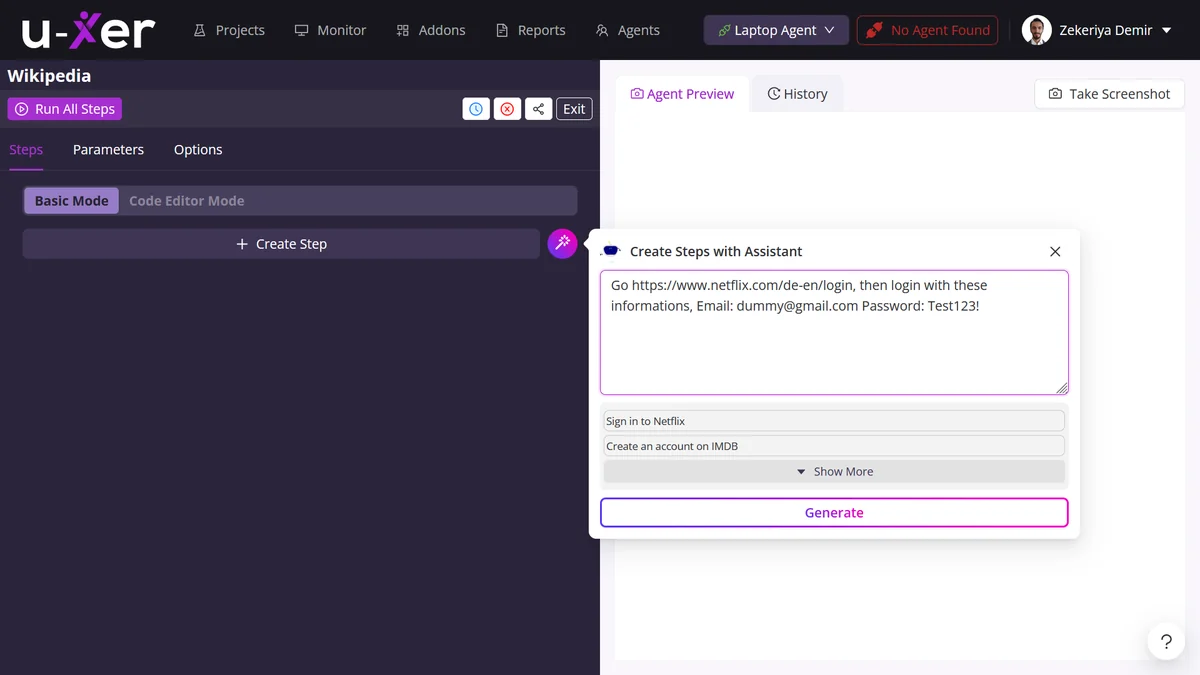
- Natural Language Processing: Create automation scripts by simply writing or speaking commands in plain English. The LLM translates your natural language into actionable automation scripts.
- Personalized AI Agents: Build custom knowledge bases for your projects. These agents learn from your directives and past scenario executions, improving future automation accuracy and efficiency.
- Scenario Modes: Choose from Manual Mode for custom step creation, Consistent Mode for reusable steps, and Dynamic Mode for scenarios that require different content each run.
- Comprehensive Reporting: Receive detailed reports on the success rate, failures, and queued status of your automated actions, providing clear visibility into your automation performance.
- Adaptable to Updates: U-xer is designed to seamlessly adapt to application updates, minimizing the need for constant maintenance.
How It Works
The core functionality of U-xer revolves around its ability to interpret visual information and translate natural language into automated actions. Users can input commands through simple text, outlining the steps they wish to automate.
For instance, you can instruct U-xer to write text, select items, validate data, or open a web browser. The integrated LLM then processes these instructions, generating the necessary automation scripts. U-xer’s computer vision technology then executes these scripts by interacting with your screen, replicating mouse clicks and keyboard inputs.
A notable advancement is the introduction of Personalized AI Agents. These agents can build custom knowledge bases by learning from your previous automation scenarios and U-xer’s system scenarios. You can provide specific information or directives, and the agent will use this data to generate informed and more accurate new scenarios, continuously improving its performance based on your feedback and corrections.

Use Cases
U-xer’s versatility makes it suitable for a wide range of automation needs:
- Software Testing: Automate test scripts for web and desktop applications, including complex user interface interactions and validation checks.
- Repetitive Data Entry: Automate tasks such as filling out forms, copying and pasting data between applications, or sorting information.
- Legacy Application Automation: Interact with older software that might not have modern APIs, using computer vision to navigate and operate them.
- Process Optimization: Streamline everyday business processes by automating routine tasks, freeing up employees for more strategic work.
- Content Generation & Validation: Automate the creation and checking of content, leveraging LLM capabilities for tasks like writing product descriptions or validating data.
Integrations & Compatibility
- U-xer is built to be highly compatible, supporting automation across various environments
- It functions on both Windows and macOS operating systems
- The tool’s computer vision capabilities allow it to interact with a broad spectrum of applications, including web browsers, desktop applications, legacy systems, 3D elements, and even games
- This broad compatibility means it can be integrated into almost any workflow, regardless of the underlying technology.
Pricing & Value
The value proposition of U-xer lies in its ability to democratize automation. By allowing users to create complex automations with simple language commands, it significantly reduces the need for specialized technical skills, thereby lowering the barrier to entry for automation.
The tool’s capacity to handle repetitive tasks efficiently can lead to substantial time savings and increased productivity for individuals and businesses. Its adaptability and comprehensive reporting features further enhance its value by providing a robust and user-friendly automation solution.
Deal Details
This offering provides lifetime access to U-xer, ensuring ongoing access to its features and updates. The deal comes with a 60-day money-back guarantee, allowing users ample time to test its capabilities and confirm its suitability for their specific needs.
Quick Take
- Ideal for individuals and businesses seeking to automate repetitive tasks without extensive coding knowledge.
- Offers a powerful combination of computer vision, LLM, and RPA for versatile automation capabilities.
- The Personalized AI Agents and flexible scenario modes enhance its effectiveness for diverse use cases.
FAQs
What are Personalized AI Agents in U-xer?
Personalized AI Agents create custom knowledge bases that learn and improve future automation scenarios.
How does U-xer handle application updates?
U-xer seamlessly adapts to application updates with minimal maintenance required from the user.
Do I need to be a programmer to use U-xer?
No, U-xer allows automation creation using simple natural language commands.
Can U-xer automate tasks on any application?
Yes, U-xer’s computer vision allows it to automate tasks on virtually any application on Windows and macOS.
What is the primary benefit of using U-xer?
U-xer automates repetitive tasks using computer vision and natural language, saving time and effort.
Final Thoughts
U-xer presents a compelling solution for anyone looking to offload repetitive digital labor. Its innovative approach, leveraging computer vision and LLMs, makes automation accessible to a broader audience. The ability to create automations with simple language, combined with its robust feature set and wide compatibility, positions it as a valuable tool for enhancing productivity.
For individuals and teams grappling with time-consuming manual processes, U-xer offers a path towards more streamlined workflows and increased operational efficiency. The lifetime deal further solidifies its appeal as a long-term investment in automation.