
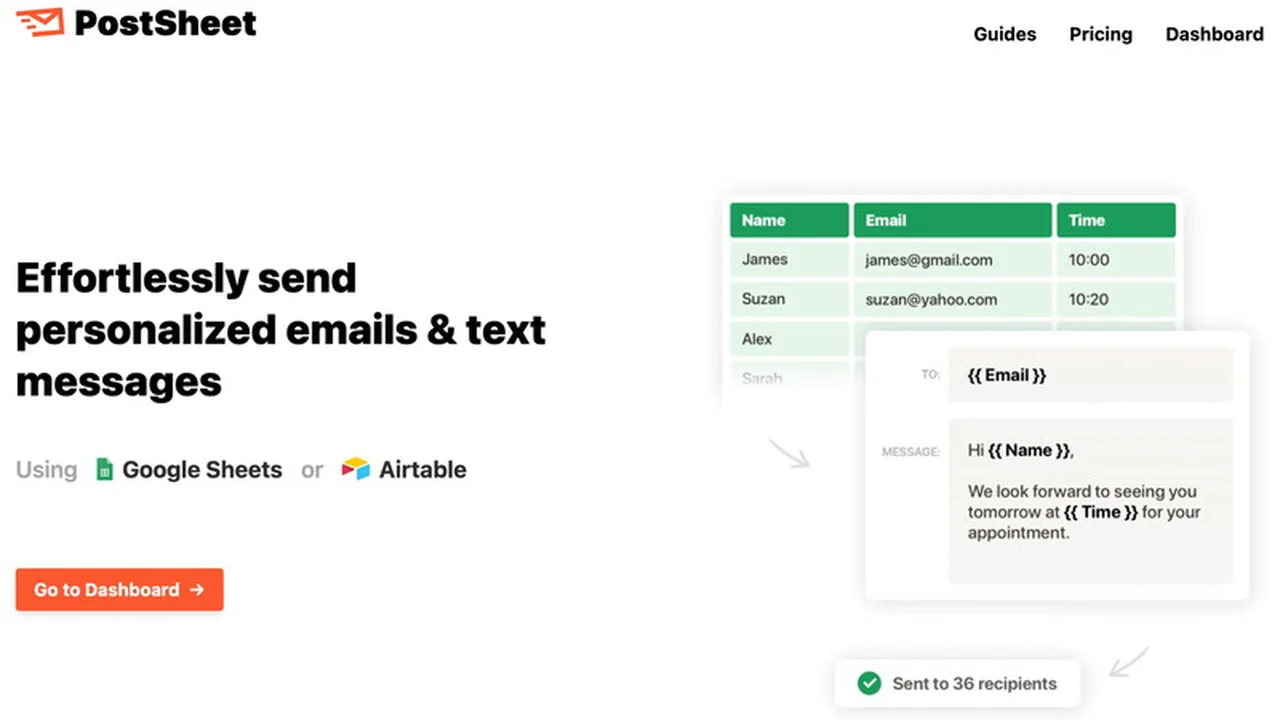
Discover how PostSheet can revolutionize your outreach by integrating directly with your Google Sheets or Airtable.
This review will guide you through its features, functionality, and how it can elevate your sales and marketing efforts, ultimately saving you valuable time.
What is PostSheet | AppSumo
PostSheet is a practical tool designed to simplify and scale your communication strategies, allowing you to send personalized emails and text messages directly from your preferred spreadsheet software. It addresses the common challenges of manual outreach, such as time consumption and the difficulty of maintaining a personal touch at scale.
Key Features
PostSheet offers a robust set of features aimed at enhancing your messaging efficiency and effectiveness:
- Email and SMS Sending: Facilitates the sending of both email and SMS messages directly from Google Sheets or Airtable.
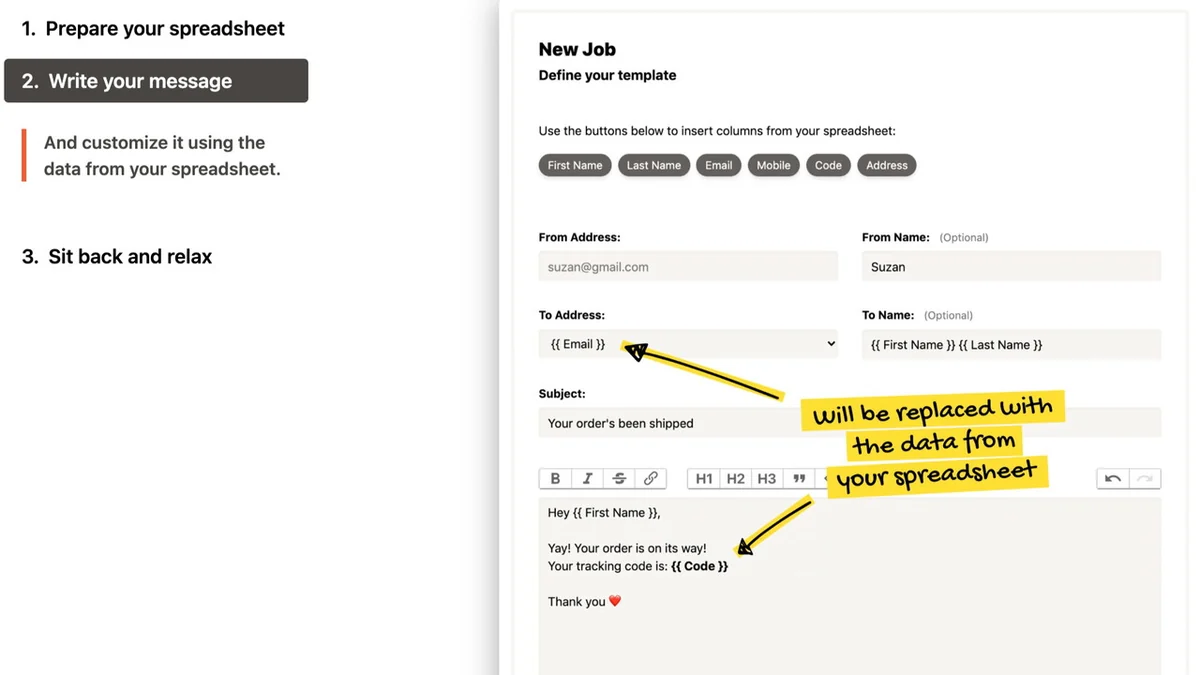
- Personalization Capabilities: Enables the creation of messages that feel individual to each recipient, improving engagement and reply rates.
- Campaign Scheduling: Allows you to schedule your outreach campaigns in advance, ensuring timely delivery.
- Opt-Out Functionality: Provides recipients with an easy way to opt out of future communications.
- Contact Import: Offers the ability to import contacts from Excel and upload contacts for future use.
- Increased Send Limits: The ‘Growth’ tier provides a significant monthly send limit of up to 50,000 messages.
- 14-Day Free Trial: A trial period is available to test the service before committing.
How It Works
Getting started with PostSheet is a straightforward process designed for ease of use:
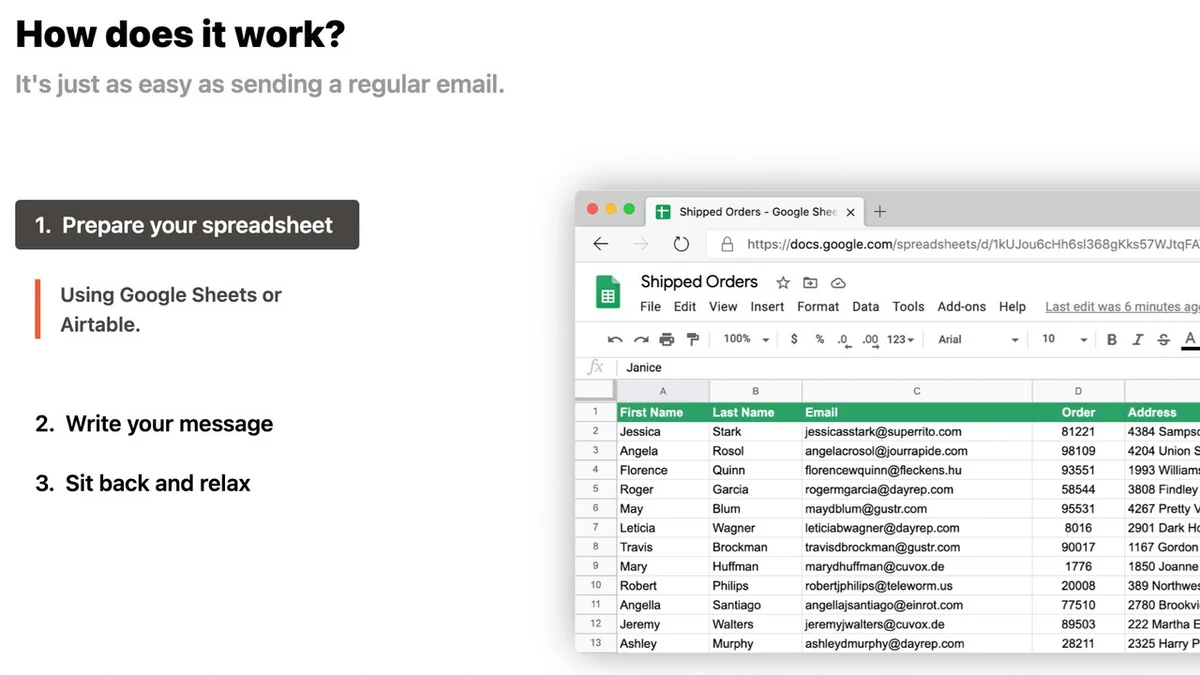
Step 1: Prepare Your Spreadsheet
Organize your recipient data, including contact information and any personalization fields, within your Google Sheet or Airtable base.
Step 2: Connect Your Service Provider
Link PostSheet to your chosen email or SMS service provider to enable message delivery.
Step 3: Select Your Spreadsheet
Choose the specific spreadsheet containing your campaign data within the PostSheet interface.
Step 4: Configure and Send
Set up your message templates, define personalization parameters, and initiate your campaign.
Use Cases
PostSheet is a versatile tool suitable for a variety of outreach needs:
- Sales Outreach: Send personalized follow-ups, introductory messages, and promotional offers to leads.
- Marketing Campaigns: Distribute newsletters, event invitations, and special announcements to your audience.
- Customer Service: Automate appointment reminders, order confirmations, and customer feedback requests.
- Networking: Reach out to industry contacts and potential collaborators efficiently.
- Event Promotion: Send invitations and updates to attendees for conferences, webinars, or local events.
Integrations & Compatibility
- PostSheet’s core functionality is built around seamless integration with widely used data management platforms
- It allows you to leverage your existing data stored in Google Sheets and Airtable .
Pricing & Value
PostSheet offers a tiered pricing structure designed to accommodate various user needs, from individuals to growing businesses. The value proposition lies in its ability to automate time-consuming manual tasks, enhance message personalization, and improve campaign ROI, all within a user-friendly interface.
Deal Details
The PostSheet AppSumo deal provides an opportunity to access its full suite of features at a compelling price point. This often includes lifetime access to certain plans or significant discounts compared to standard subscription models. The deal is backed by a 60-day money-back guarantee, allowing you to try the product risk-free for two months.
Quick Take
- Ideal for individuals and businesses looking to send personalized messages at scale.
- Simplifies outreach by integrating directly with Google Sheets and Airtable.
- Saves time and improves engagement for sales and marketing campaigns.
FAQs
What if my spreadsheet is in Excel format?
PostSheet offers the ability to import contacts from Excel files.
Is there a way for recipients to opt out?
Yes, recipients have the ability to opt out of future communications.
Does it work with Airtable?
Yes, PostSheet integrates with Airtable for sending messages.
Can I send both emails and SMS?
Yes, PostSheet supports sending both email and SMS messages.
What is PostSheet?
PostSheet is a tool for sending personalized emails and text messages from Google Sheets or Airtable.
Final Thoughts
PostSheet presents a practical and efficient solution for anyone looking to streamline their communication efforts. By connecting directly with Google Sheets and Airtable, it removes the friction often associated with mass personalized messaging. The ability to schedule campaigns, personalize content, and manage opt-outs makes it a valuable asset for sales professionals, marketers, and small business owners aiming for greater engagement and efficiency in their outreach.