
Are you tired of manually sending follow-up emails and losing potential clients due to oversight? This review explores a powerful Gmail extension designed to streamline your communication and boost response rates.
We’ll delve into how Rebump automates your email follow-up process, ensuring no opportunity slips through the cracks. Discover its features, understand its workflow, and see if it’s the right solution for your needs.
What is Rebump – Automate follow-up emails on Gmail | AppSumo
Rebump is a Gmail extension that automates the process of sending follow-up emails to your contacts. It acts as a proactive assistant, sending out gentle reminders or additional information at predefined intervals until a response is received. This helps ensure that important communications don’t get lost in busy inboxes, ultimately aiming to increase reply rates and close more deals.
Key Features
- Automatic Follow-up Emails (Bumps): Schedule and send automated follow-up messages to contacts.
- Intelligent Stopping: Follow-up sequences automatically cease once the recipient replies.
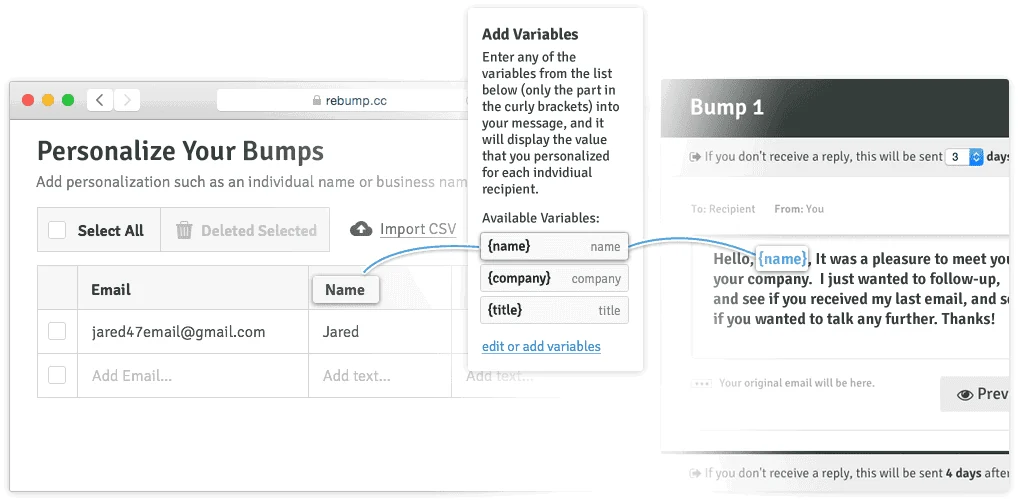
- Personalization Options: Customize your follow-up messages to maintain a human touch.
- Centralized Dashboard: Monitor the status of all your email communications in one convenient place.
- Open/Read Tracking: Gain insights into whether your follow-up emails have been opened.
- Expiration Notifications: Receive alerts when a follow-up expires without a response.
- BCC Feature: Facilitates follow-ups when using mobile or other email clients.
How It Works
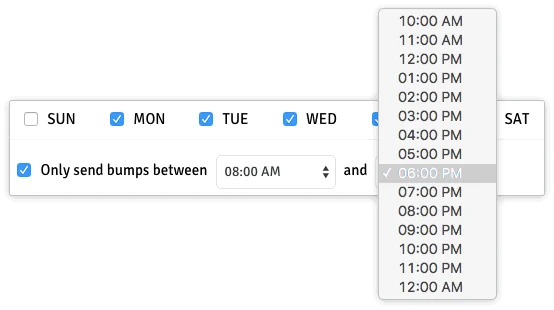
Setting up Rebump is designed to be straightforward. Once installed as a Gmail extension, you can compose your initial email as usual. For each email, you have the option to add a follow-up sequence. You define the timing of these follow-ups (e.g., 2 days, 5 days later) and the content of each subsequent message. Rebump then monitors your sent emails and automatically dispatches these follow-ups according to your schedule. The system intelligently detects replies, pausing the sequence to prevent unnecessary messages.
Use Cases
- Sales Professionals: Ensure timely follow-ups with leads and prospects, preventing lost sales.
- Customer Support: Follow up on unresolved inquiries or post-interaction surveys.
- Networking: Keep in touch with new contacts and nurture relationships effectively.
- Job Seekers: Automate follow-ups after submitting applications or attending interviews.
- Freelancers: Remind clients about outstanding invoices or project updates.
Integrations & Compatibility
- Rebump seamlessly integrates with your existing Gmail account
- It also offers integration capabilities with your Customer Relationship Management (CRM) system, allowing for a more connected workflow and enhanced data management.
Pricing & Value
The AppSumo deal provides a lifetime access to Rebump’s Unlimited Plus plan, which includes all current and future features. This offers significant value for individuals and businesses looking to automate a critical aspect of their communication strategy without recurring monthly fees. The ability to get all features at a one-time price makes it an attractive proposition for long-term use.
Deal Details
The current AppSumo deal offers lifetime access to Rebump Unlimited Plus for a single payment of $49. This deal includes all features and is designed to be a one-time purchase, eliminating the need for stacking codes or future upgrades for the core functionality. A 60-day money-back guarantee is also included, allowing users to test the service risk-free.
Quick Take
- Ideal for anyone who relies on Gmail for communication and wants to improve response rates.
- Excellent for sales teams and busy professionals who struggle to keep up with follow-ups.
- Offers a cost-effective, one-time purchase solution for email automation.
FAQs
Is there a limit to the number of follow-ups I can send?
The Unlimited Plus plan typically offers generous or no limits on follow-up sequences.
How do I access the Rebump dashboard?
You can access the Rebump dashboard directly through the extension’s interface.
What happens if the recipient replies before the follow-up is sent?
The follow-up sequence automatically stops once the recipient replies to your email.
Can I customize the content of my follow-up emails?
Yes, you can personalize the content of each automated follow-up message.
Is Rebump compatible with all Gmail accounts?
Yes, Rebump is designed to work with standard Gmail accounts.
Final Thoughts
Rebump presents a compelling solution for anyone looking to enhance their email communication efficiency. By automating follow-ups, it frees up valuable time and helps ensure that important conversations don’t go unanswered. The Lifetime Deal available through AppSumo offers a significant financial advantage, making it an accessible tool for a wide range of users. If improving your email response rate and streamlining your follow-up process is a priority, Rebump is certainly worth considering.