

For anyone who creates video content, the editing process can often feel like a significant hurdle.
This review explores Wisecut, an AI-powered video editor designed to reclaim your time and simplify your workflow, allowing you to focus on content creation.
What is Wisecut – Use an AI editor to create unique videos | AppSumo
Wisecut is an artificial intelligence-driven video editing application that leverages voice recognition and AI algorithms to automate and streamline the video creation process. It aims to significantly reduce the time and technical expertise traditionally required for editing, making it accessible for a wider range of users.
Key Features
- AI-Powered Auto Cut: Automatically removes long pauses and unnecessary gaps in your footage, creating seamless jump cuts.
- Smart Background Music: Select royalty-free tracks from a library, and Wisecut will automatically adjust the music to fit the pacing of your video, ensuring it’s ready for monetization.
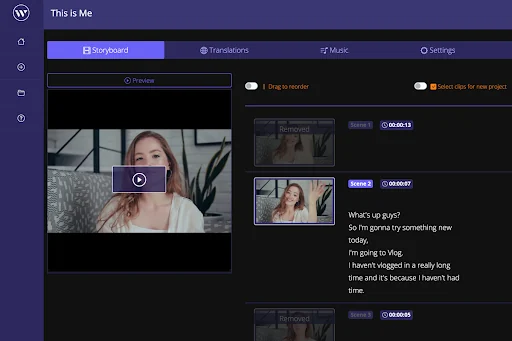
- AI Storyboard Tool: Generates a transcribed storyboard of your video, enabling you to edit directly by manipulating text, eliminating the need for complex video editing skills.
- Auto Captions: Creates subtitles for your videos automatically, enhancing accessibility and viewer engagement.
- Subtitle Translation: Offers one-click translation of subtitles into multiple languages to reach a broader audience.
- AI-powered Audio Ducking and Voice Booster: Intelligently balances audio levels, lowering background music when someone speaks and raising it during pauses, while also reducing background noise.
- Facial Recognition ‘Punch In/Out’: Employs AI and facial recognition to automatically add close-up shots, simulating a second camera angle for a more dynamic presentation.
- Wisecut Snippets: Enables the quick creation of shorter video versions for different platforms, maximizing content reach.
How It Works
Wisecut operates by analyzing the dialogue within your video. This analysis allows the AI to make intelligent editing decisions, such as identifying and removing long pauses or awkward silences. The platform also provides a transcribed storyboard, which functions as a text-based editor, allowing users to make changes to the video by simply editing the text. For audio, AI is used to manage background music and enhance speech clarity. Features can typically be enabled or disabled with a simple click, offering flexibility in the editing process.
Use Cases
- Content creators and YouTubers looking to speed up their editing workflow.
- Vloggers who want to produce engaging videos without spending hours in post-production.
- Entrepreneurs and coaches who need to create professional video content for marketing or educational purposes.
- Reviewers and gamers aiming to share their experiences concisely and effectively.
- Anyone needing to create shorter cutdowns for social media distribution.
Pricing & Value
Wisecut is presented as a solution to reclaim time and reduce the complexity associated with video editing. By automating many time-consuming tasks, it offers a value proposition centered on efficiency and accessibility for creators of all levels.
Deal Details
The AppSumo deal for Wisecut provides lifetime access to the AI video editor. This typically includes all features across different plans and ongoing updates. A 60-day money-back guarantee is also available, allowing users to test the platform extensively.
Quick Take
- Ideal for content creators and YouTubers seeking to cut down editing time.
- Offers AI-driven features like auto-cutting and smart music for a polished final product.
- Simplifies video editing through a text-based storyboard interface.

FAQs
Does Wisecut allow for manual editing adjustments?
Yes, the platform allows for additional tweaks and adjustments even after AI processing.
Is Wisecut suitable for beginners?
Yes, its AI storyboard and intuitive interface make it user-friendly for all skill levels.
How does Wisecut handle background music?
Wisecut automatically syncs and tailors royalty-free background music to your video’s pacing.
Can Wisecut help with making videos accessible?
Yes, Wisecut offers auto captions and subtitle translation to enhance video accessibility.
What is the primary benefit of using Wisecut?
Wisecut’s primary benefit is its ability to automate tedious video editing tasks, saving creators significant time.
Final Thoughts
Wisecut presents a compelling solution for individuals and businesses overwhelmed by the demands of video editing. By harnessing AI, it automates key processes such as pause removal, music synchronization, and captioning. The unique text-based editing approach through its AI storyboard tool further democratizes video creation. For those prioritizing content output and efficiency, Wisecut offers a powerful and accessible way to produce professional-looking videos with less effort.