

Struggling to efficiently integrate external data into your Figma designs? Manual data entry and repetitive design updates can significantly slow down your creative process.
This review explores Table To Figma | AppSumo, a solution designed to bridge the gap between your data sources and your Figma projects, unlocking new levels of design efficiency.
What is Table To Figma | AppSumo
Table To Figma is a powerful plugin that seamlessly syncs data from various sources directly into your Figma designs. It aims to eliminate the tedious task of manually transferring information, allowing for dynamic and up-to-date visual assets.
Key Features
- Seamless Data Sync: Connect and import data from Notion, Google Sheets, CSV/XLSX, Airtable, and even clipboard content.
- Dynamic Design Generation: Swiftly create thousands of design variations by blending your data with design templates.
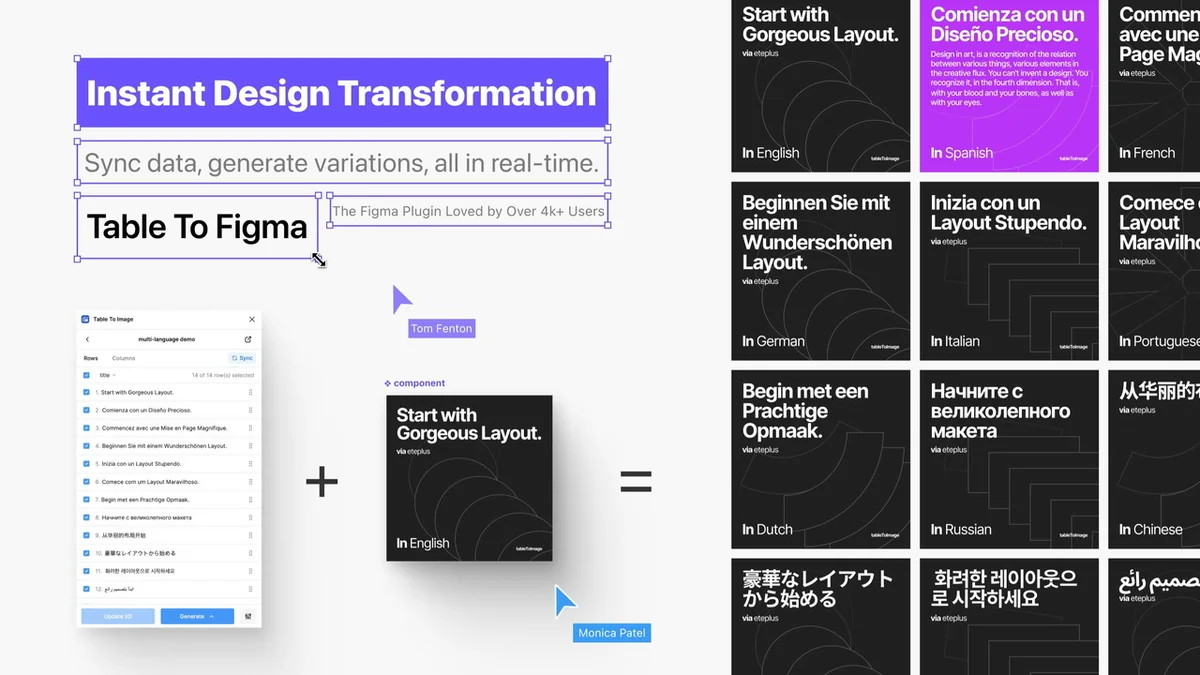
- Bulk Design Updates: Effortlessly synchronize external data sources with Figma for quick and accurate design modifications.
- Customizable Design Properties: Advanced tools allow for tailoring design elements such as color, gap, and padding using hex codes and numerical inputs.
- Layer Renaming & Custom Layouts: Streamline your workflow with features for efficient layer management and flexible layout adjustments.
- Boolean Visibility Toggling: Control the visibility of design elements based on Boolean values from your data.
- Autolayout Support: Automatically arrange content according to specified formats to maintain consistent design structure.
- Canvas Renaming: Automatically rename canvases based on data columns and custom rules for better organization.
How It Works
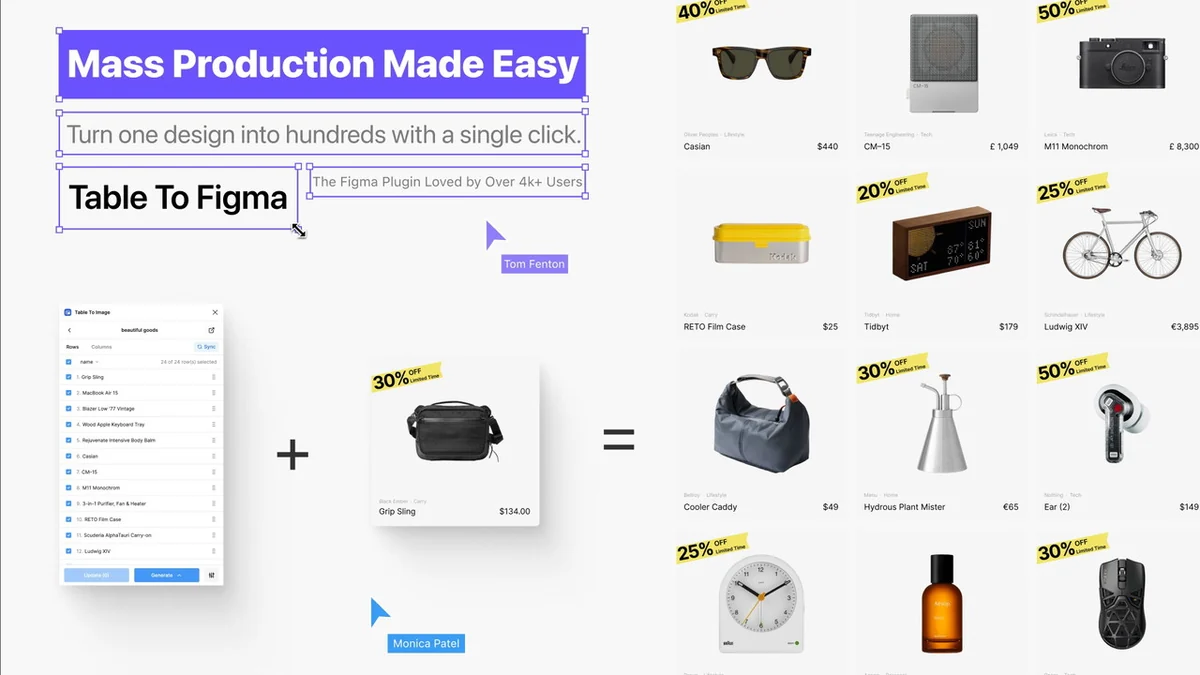
The process is designed for simplicity. After connecting your data source, you map specific data fields to corresponding elements within your Figma design. Table To Figma then uses this mapping to generate multiple design instances, each populated with the relevant data. This can include text, numbers, images from URLs, and even control element visibility.
Use Cases
- UI Designers: Seamlessly integrate external user data into prototypes for realistic previews.
- Content Creators: Efficiently update marketing materials in bulk by syncing data from various sources.
- Educators & Students: Visualize complex information and data sets in an engaging format.
- E-commerce Professionals: Rapidly update product listings, generate visual variations, and modify product graphics in large quantities.
- Bulk Design Production: Ideal for generating numerous similar designs with minor variations, such as invitations, social media graphics, or ad variations.
Integrations & Compatibility
- Table To Figma supports a range of popular data sources, ensuring broad compatibility
- It directly integrates with Notion, Google Sheets, CSV/XLSX files, and Airtable
- Data can also be pasted directly from your clipboard
- The plugin functions within the Figma environment, leveraging its design capabilities.
Pricing & Value
The value proposition of Table To Figma lies in its ability to dramatically reduce the time and effort spent on repetitive design tasks. By automating data-driven design generation and updates, it allows designers to focus on more creative and strategic aspects of their work. The efficiency gains can translate into significant cost savings and faster project turnaround times.
Deal Details
This product is available through a special deal, offering lifetime access. The offer typically includes a comprehensive set of features and is backed by a money-back guarantee, allowing users to try the tool risk-free for a specified period.
Quick Take
- Perfect for designers needing to produce many design variations quickly.
- Ideal for teams and individuals looking to automate data-driven design updates.
- A valuable tool for anyone working with structured data and visual design in Figma.
FAQs
Can this tool automatically generate images based on the image URLs in this spreadsheet?
Yes, it supports automatic image recognition for Google Sheets, Notion, and Airtable URLs.
Hello, Your tool looks kind of interesting, but I don’t really understand what you can do with it.
It boosts workflow efficiency for e-commerce graphics, UI design, and marketing materials generation.
So does one AppSumo code relate to one usage or one user?
One code binds a Figma user to use multiple websites, requiring only one account.
Do you have any video tutorials on how this product is used?
Sorry, we don’t have video tutorials yet; check the document tutorials first.
What makes your product different from Google Sheet Sync plugin?
It offers multi-source import, layer renaming, design updates, multi-tag support, caching, and autolayout features.
Final Thoughts
Table To Figma | AppSumo presents itself as an essential tool for anyone looking to streamline their design process within Figma. By effectively bridging data sources with design elements, it tackles common pain points like manual data entry and the creation of numerous design variations. Its comprehensive feature set and broad compatibility make it a versatile solution for a variety of professional and educational use cases. The AppSumo deal offers a compelling opportunity to integrate this efficiency-boosting tool into your workflow.