

Navigating the vast landscape of AI tools can feel overwhelming, with each specializing in a narrow set of tasks. This often leads to a fragmented workflow, requiring users to switch between multiple applications for research, writing, and summarization.
This review explores a comprehensive solution designed to streamline your digital activities. We will delve into how this extension integrates powerful AI capabilities directly into your browser, aiming to boost efficiency and simplify content creation.
What is Merlin – All-in-one AI Google Chrome extension | AppSumo
Merlin is a versatile Google Chrome extension that consolidates numerous AI functionalities into a single, accessible interface. It aims to act as an all-in-one digital assistant, allowing users to research, summarize, and generate content without leaving their web browser. By providing access to leading AI models, Merlin seeks to simplify complex tasks and enhance overall productivity for a wide range of users.
Key Features
Merlin offers a robust suite of features designed to address various content-related needs. These include:
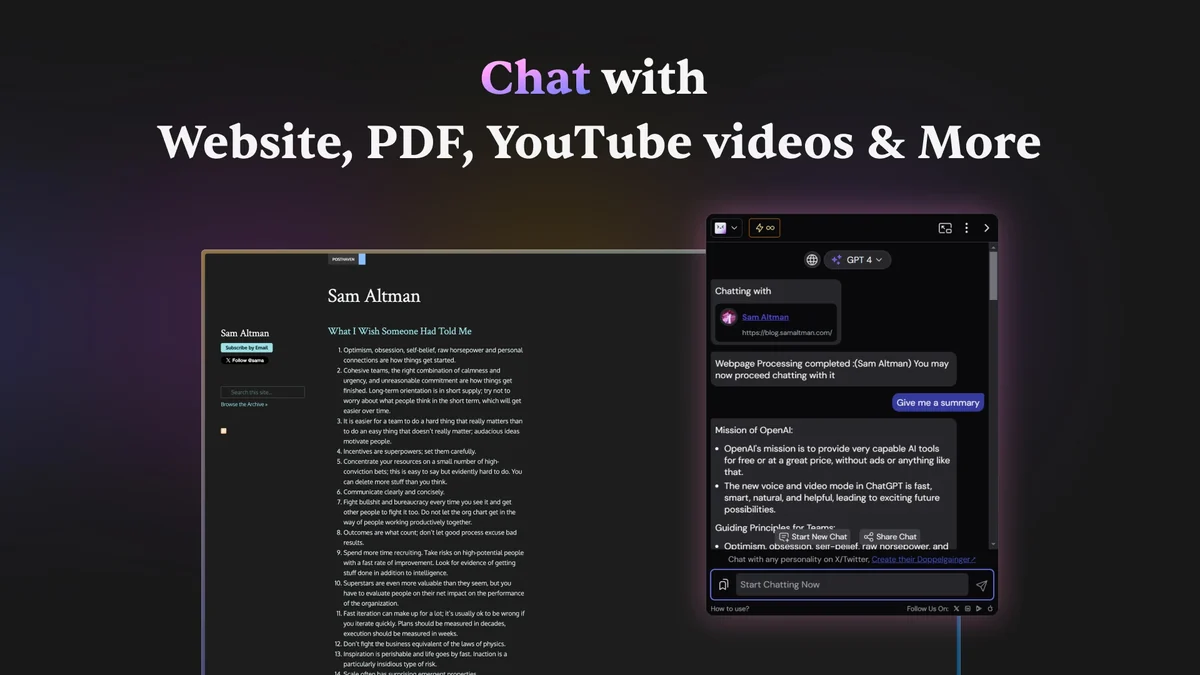
- AI Chat with Websites and Documents: Seamlessly interact with any webpage or uploaded document to get instant answers and insights.
- Content Generation: Create content for platforms like LinkedIn, Gmail, and X (formerly Twitter) directly from your browser.
- Summarization Capabilities: Quickly condense information from websites, PDFs, YouTube videos, blogs, and other online content.
- Access to Top AI Models: Utilize popular AI technologies such as GPT-4, Claude-3, Gemini 1.5, and Leonardo for advanced capabilities.
- Projects: An AI assistant that learns from your files to provide personalized support.
- Crafts: A dedicated window for creating and visualizing code, graphs, and diagrams.
- 70+ AI Helpers: A broad toolkit of over 70 AI-powered tools for diverse tasks.
How It Works
Operating Merlin is designed to be intuitive. Once installed as a Chrome extension, it integrates directly into your browsing experience. Users can typically invoke Merlin’s features through hotkeys, context menus, or a dedicated interface within the browser. This allows for quick access to its AI functionalities, whether it’s asking a question about a webpage, summarizing a lengthy article, or drafting an email.

Use Cases
Merlin caters to a broad spectrum of users and their daily tasks:
- Marketers: Generate social media posts, draft ad copy, and research market trends.
- Students: Summarize research papers, get quick explanations of complex topics, and draft essays.
- Professionals: Compose emails, summarize meeting notes, and research industry information.
- Developers: Generate code snippets, visualize data, and understand technical documentation.
- Content Creators: Draft blog posts, create video scripts, and brainstorm content ideas.
Integrations & Compatibility
- As a Google Chrome extension, Merlin is inherently compatible with any website you visit within the Chrome browser
- It is designed to work seamlessly across various web platforms, enhancing your experience with AI capabilities wherever you browse online
- Its functionality is directly tied to your browser environment.
Pricing & Value
Merlin is available through a lifetime deal on AppSumo, offering significant value. Past pricing tiers for this product have ranged from around $5 for entry-level access to higher amounts like $29, $60, and up to $250 for more comprehensive feature sets or higher usage limits. The lifetime deal structure positions it as a one-time investment for ongoing access to its AI tools and updates.
Deal Details
The current AppSumo deal for Merlin – All-in-one AI Google Chrome extension provides lifetime access to its extensive features. This often includes updates and access to new AI models as they become available. The offer typically comes with a 60-day money-back guarantee, allowing users to try the service risk-free.
Quick Take
- For individuals and teams looking to consolidate multiple AI tools into one browser-based solution.
- Offers a wide array of AI functionalities for research, writing, and summarization, aiming to boost productivity.
- Provides a cost-effective, one-time investment for continuous AI assistance.
FAQs
What is the refund policy for the Merlin deal?
The Merlin deal typically includes a 60-day money-back guarantee.
What platforms can I generate content for with Merlin?
You can generate content for LinkedIn, Gmail, and X (formerly Twitter) with Merlin.
Is Merlin suitable for professionals?
Yes, professionals can use Merlin for tasks like drafting emails and summarizing documents.
Can Merlin use GPT-4?
Yes, Merlin provides access to leading AI models including GPT-4.
What is Merlin’s primary function?
Merlin acts as an all-in-one AI Chrome extension for research, summarization, and content writing.
Final Thoughts
Merlin – All-in-one AI Google Chrome extension presents a compelling proposition for anyone seeking to enhance their digital workflow with artificial intelligence. By consolidating a broad range of AI capabilities into a single, easy-to-use browser extension, it effectively addresses the fragmentation often found when relying on multiple single-purpose tools. Its ability to summarize information, generate content across various platforms, and offer direct AI interaction with web content makes it a powerful asset.
The continuous updates and access to cutting-edge AI models, coupled with a lifetime deal structure, suggest a strong value proposition. For users aiming to boost productivity, streamline content creation, and leverage the power of AI efficiently, Merlin appears to be a noteworthy solution worth considering.