

Manually sending emails one by one is a significant drain on productivity, proving tedious, time-consuming, and almost impossible to scale effectively.
This review dives deep into Pigeon Mail, exploring its capabilities to send personalized mass emails directly from Gmail, complete with built-in tracking, personalization, and scheduling to help you reach more people with minimal effort.
What is Pigeon Mail | AppSumo
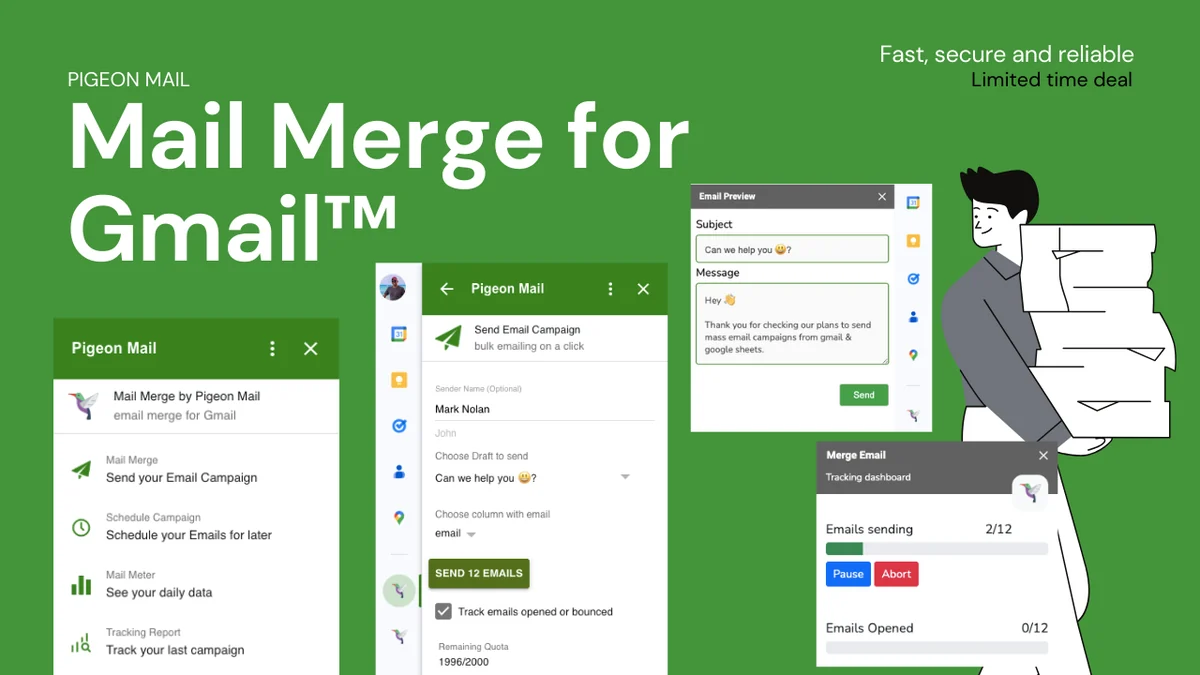
Pigeon Mail is a powerful tool designed to transform your email outreach strategy. It allows users to send mass emails directly from their Gmail interface, eliminating the need for clunky external platforms or complex integrations. The focus is on maintaining a personal touch while scaling your communication efforts, making it ideal for businesses and individuals looking to enhance their email marketing and client communication.
Key Features
- Personalized Mass Emails: Craft and send emails to multiple recipients, personalizing each message with custom fields and dynamic content from your data.
- Directly from Gmail: All email composition and sending happen within your familiar Gmail environment, ensuring a seamless user experience.
- Built-in Tracking: Monitor email opens and clicks with real-time analytics, providing valuable insights into recipient engagement.
- Scheduling Capabilities: Plan and schedule your email campaigns in advance, ensuring your messages reach your audience at the optimal time.
- Simple Setup: Get started quickly with a straightforward setup process that requires no coding knowledge.
How It Works
Pigeon Mail integrates directly with your Gmail account, acting as an add-on. You can compose your email within Gmail as you normally would, but with the added ability to pull data from a connected spreadsheet (like Google Sheets) for personalization. This allows you to use recipient names, company details, or any other custom fields to make each email feel individually crafted. Once composed, you can select a recipient list, set your sending preferences (like individual send times or intervals), and schedule the campaign or send it immediately. The platform then handles the delivery and provides you with analytics on who opened and clicked your emails.

Use Cases
- Sales Outreach: Efficiently send personalized follow-ups and introductory emails to a large list of prospects.
- Marketing Campaigns: Launch targeted email marketing initiatives without leaving your Gmail inbox.
- Client Communication: Keep your existing clients informed with updates, newsletters, or special offers.
- Event Invitations: Send out bulk invitations for webinars, workshops, or company events.
- Networking: Expand your professional network by sending personalized connection requests or follow-ups.
Integrations & Compatibility
- Pigeon Mail is designed to work seamlessly with Gmail
- While not explicitly detailing extensive third-party integrations, its core functionality is built around the Google ecosystem, leveraging Google Sheets for data input and operating directly within the Gmail interface
- This tight integration ensures a smooth and intuitive user experience for Gmail users.
Pricing & Value
Pigeon Mail is offered through AppSumo, providing lifetime access to its features. This approach shifts the traditional subscription model to a one-time purchase, offering significant long-term value. By consolidating features like personalization, tracking, and scheduling into a single tool that operates within Gmail, it aims to save users both time and money compared to managing multiple disparate services.
Deal Details
The AppSumo deal for Pigeon Mail typically involves a one-time payment that grants lifetime access to the platform’s features. Specifics of the deal, such as the number of users, emails per month, or feature tiers, can vary. It’s always recommended to check the current AppSumo listing for the most up-to-date information on the included features and any limitations. The deal also often comes with a 60-day money-back guarantee, allowing users to test the service risk-free.
Quick Take
- Ideal for Gmail users who need to send personalized bulk emails.
- Streamlines outreach with tracking and scheduling directly within your inbox.
- Offers a cost-effective lifetime access deal for enhanced email productivity.
FAQs
What is more important is that there is NO Support from the Vendor (5 tickets) nor Appsumo.
Report issues directly through the designated support channels provided by the vendor.
I watched the video and redeemed the app. After installed the Add on i cannot see the icon like in you video. Can you help?
Check the add-on settings within Gmail to ensure it is enabled and visible.
Are the codes transferrable?
Codes can generally be transferred to different email addresses if needed.
If you nominate the “from” email address using an alias, will this extension also use this “from” email?
The extension is designed to support sending from aliases associated with your Gmail account.
Where can we find your changelog?
Changelogs are shared via email threads for updates and feature developments.
Final Thoughts
Pigeon Mail presents a compelling solution for anyone looking to inject personalization and efficiency into their mass email efforts directly from Gmail. By simplifying the process and providing essential tracking features, it addresses a common pain point for marketers, salespeople, and business owners alike. The lifetime deal structure through AppSumo further enhances its appeal, offering a potentially high return on investment. While user feedback sometimes points to occasional hiccups, the core functionality and convenience it offers make it a tool worth considering for optimizing your email outreach strategy.