
Tired of video calls where engagement plummets and participation fades? Reslash offers a fresh approach to online interaction, moving beyond the traditional grid layout to foster genuine connection.
This review explores how Reslash empowers users to build dynamic virtual environments that mimic real-life social and work experiences, making online gatherings more interactive and enjoyable.
What is Reslash – Build virtual workplaces for connecting | AppSumo
Reslash is a comprehensive platform designed for creating interactive virtual spaces where users can socialize, collaborate, learn, or simply hang out. It aims to recapture the spontaneity and connection found in physical environments, making online interactions feel more natural and engaging.
Key Features
- Customizable Spatial Rooms with Spatial Audio: Experience conversations that feel more natural with audio that adjusts based on proximity to other participants.
- Space and Room Permissions: Control access and curate the experience within your virtual environments.
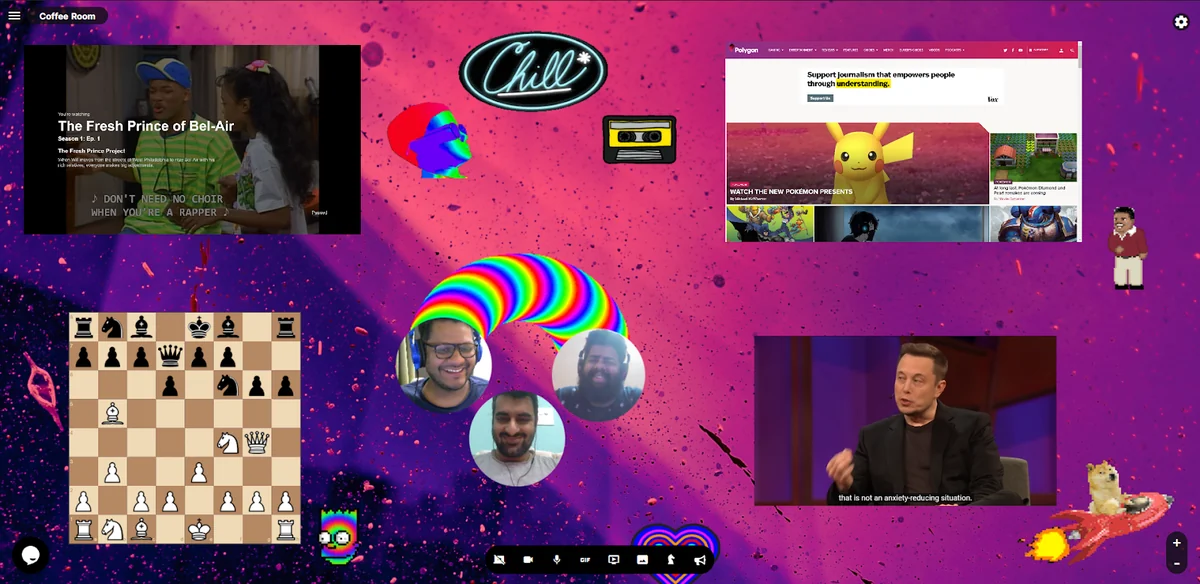
- Integrated Apps: Enhance collaboration and entertainment with tools like Google Docs, YouTube watch parties, and games.
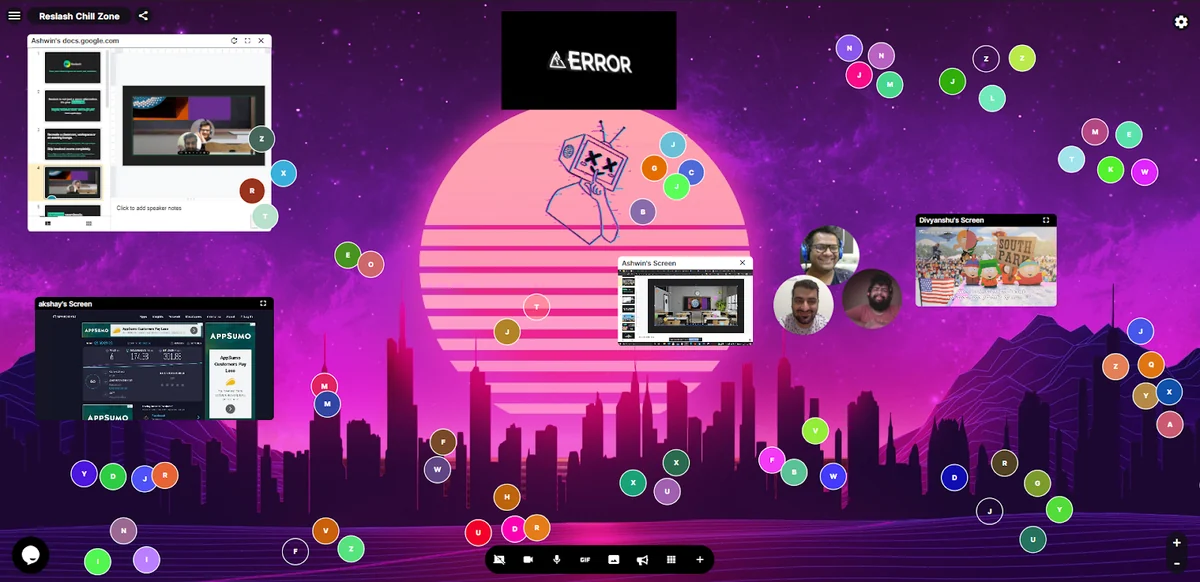
- Multiple Screen Shares: Facilitate group brainstorming and presentations by allowing several screen shares simultaneously within a single room.
- Personalized Avatars and Room Chat: Add a personal touch to your virtual presence and communicate effectively with in-room chat.
- Megaphone Functionality: Easily address everyone in the room for announcements or important information.
- Announcements Across Rooms: Disseminate critical information efficiently across different areas within your virtual space.
How It Works
Reslash allows you to build virtual environments from the ground up. You can customize backgrounds, add interactive elements, and set up designated areas for different activities. The core functionality revolves around spatial audio, where moving your avatar closer to others in the virtual space increases the volume of their conversation, and moving away reduces it, mirroring real-world acoustics.
This system supports multiple conversations happening concurrently within a single space, eliminating the need for breakout rooms and allowing participants to fluidly join or leave discussions by simply navigating the virtual environment.
Use Cases
- Virtual Workspaces: Create collaborative environments for team meetings, brainstorming sessions, and daily stand-ups.
- Social Hangouts: Host virtual parties, game nights, or casual meetups with friends and family.
- Online Education: Design engaging virtual classrooms for lectures, workshops, and interactive learning experiences.
- Networking Events: Facilitate more organic networking opportunities where attendees can move between conversations freely.
- Watch Parties: Enjoy synchronized viewing of YouTube content with friends and colleagues.
Pricing & Value
Reslash offers a tiered pricing structure designed to accommodate various needs, from individual users to larger organizations. The platform aims to provide significant value by consolidating multiple communication and collaboration tools into a single, immersive experience.
Deal Details
The current AppSumo deal provides lifetime access to Reslash. This allows users to secure the platform at a one-time payment, offering substantial long-term savings and continuous access to all features and updates.
The offer includes a 60-day money-back guarantee, giving users ample time to explore the platform and ensure it meets their expectations.
Quick Take
- Ideal for teams and groups seeking more engaging and less structured online interactions.
- Perfect for those who want to move beyond traditional video conferencing for social or collaborative purposes.
- A strong option for educators and event organizers looking to create dynamic virtual experiences.
FAQs
Is there a limit on screen shares?
You can have multiple screen shares within a single room for collaborative sessions.
How many people can be in a Reslash room?
Up to 100 people can be in a room, with multiple conversations happening simultaneously.
How does spatial audio work?
Audio volume adjusts based on your proximity to other users in the virtual space.
Can I customize my virtual space?
Yes, you can change backgrounds, avatars, and add various elements to personalize your virtual environment.
What is Reslash?
Reslash builds immersive virtual spaces for socializing, working, teaching, and hanging out like in real life.
Final Thoughts
Reslash presents a compelling alternative to conventional video conferencing tools. Its focus on spatial interaction and extensive customization options makes it an excellent choice for anyone looking to foster deeper connections and more dynamic engagement in their virtual gatherings.
Whether for professional collaboration, educational purposes, or social events, Reslash offers a unique and enjoyable way to bring people together online.