
In today’s competitive market, clear and concise product demonstrations are crucial for customer understanding and conversion. Static images often fall short when explaining complex functionalities.
This review dives deep into Vidstep, a tool designed to transform your video content into interactive, step-by-step guides, making it easier for your audience to learn and engage with your offerings.
What is Vidstep – Create easy-to-digest demo videos | AppSumo
Vidstep is a platform designed to simplify the creation of instructional and demo videos. It transforms existing video content or screen recordings into easy-to-follow, step-by-step guides. This approach aims to eliminate the complexity often associated with producing polished video content, making it accessible even without extensive editing skills.
Key Features
Vidstep offers a robust set of features to enhance video instruction:
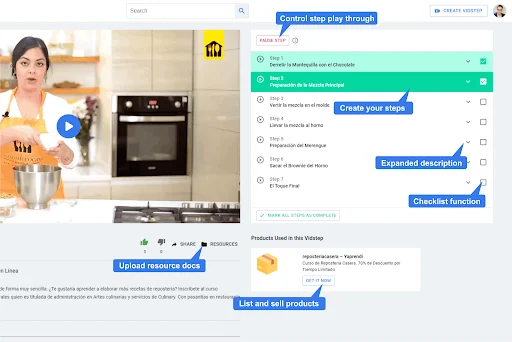
- Step-by-Step Segmentation: Break down videos into individual steps that play as tasks are completed, allowing viewers to progress at their own pace.
- Interactive Elements: Steps include expanded descriptions and can highlight automatically when viewed. Checklist functionality allows viewers to track progress.
- Resource Integration: Upload and link supplementary documents that provide further support for the video content.
- Product Linking: List and link products or services shown in the video, enabling viewers to directly purchase or access them.
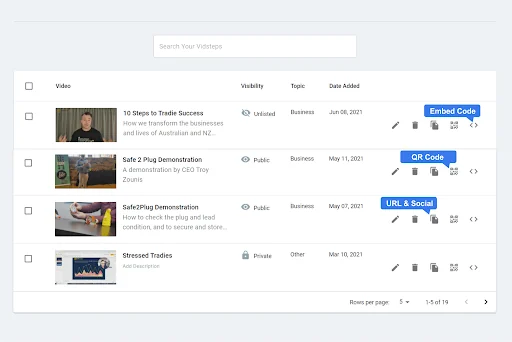
- Flexible Sharing Options: Each Vidstep generates a unique URL, embed code, and QR code for easy sharing across websites, social media, and other platforms.
- Content Management: Organize content with multiple workspaces and hubs (channels) to manage videos for different businesses, brands, or topics.
- Sequencing Capabilities: Link multiple Vidsteps together to create sequential workflows or longer instructional sequences.
- Access Control: Manage content visibility with options for public, private (email-gated), or unlisted sharing.
How It Works
Getting started with Vidstep is straightforward. You can either upload a pre-existing video file or utilize the built-in screen recording tool to capture your demonstrations. Once your video is uploaded, you can segment it into distinct steps. For each step, you can add detailed descriptions, relevant resources, and even link directly to products featured in the video.
Vidstep then provides you with shareable links, embed codes, and QR codes. This allows you to integrate your interactive video guides wherever your audience is – from your website to social media channels. The platform also supports connecting multiple Vidsteps to create a guided learning path.
Use Cases
Vidstep is particularly effective for various scenarios:
- Product Demonstrations: Clearly showcase how to use complex products, reducing customer confusion and support queries.
- Onboarding Processes: Guide new users or employees through setup procedures and software functionalities.
- Tutorials and How-Tos: Create accessible guides for DIY projects, software training, or any task requiring step-by-step instructions.
- Affiliate Marketing: Seamlessly link to recommended products within your demo videos, facilitating direct purchases.
- Internal Training: Streamline team training by providing clear, digestible video instructions.
Pricing & Value
Vidstep is available through a lifetime deal on AppSumo, offering significant long-term value. The typical pricing for similar, ongoing SaaS solutions can accumulate quickly, making a one-time purchase particularly appealing. This deal provides access to the core functionalities of Vidstep, enabling users to create and share their interactive videos without recurring monthly fees.
Deal Details
The AppSumo deal for Vidstep typically offers lifetime access to the platform. This includes features applicable to all plans, ensuring you have the necessary tools to create and manage your video content. As with most AppSumo deals, there’s a 60-day money-back guarantee, allowing ample time to test the platform’s suitability for your needs.
Quick Take
- Ideal for businesses and creators needing to explain complex products or processes through video.
- Simplifies video creation and sharing, requiring minimal technical expertise.
- Offers a cost-effective solution for interactive video demonstrations.
FAQs
Can I organize content for multiple clients or brands?
Yes, Vidstep supports multiple workspaces and hubs for content organization.
How can I share my Vidstep content?
You can share via unique URLs, embed codes, or QR codes across various platforms.
Can I monetize my Vidstep videos?
Yes, by linking products or services directly within your instructional videos.
Do I need video editing experience to use Vidstep?
No, Vidstep is designed for ease of use, requiring no complex editing skills.
What kind of videos can I create with Vidstep?
You can create step-by-step instructional product demos, tutorials, and how-to guides.
Final Thoughts
Vidstep presents a compelling solution for anyone looking to enhance their product demonstrations and instructional content. Its user-friendly interface, combined with powerful features for step segmentation and resource integration, makes it an invaluable tool for clarity and engagement. The lifetime deal structure on AppSumo further enhances its appeal by offering long-term cost savings for robust video explanation capabilities.